


Contents
A Working Draft
This is a working draft, so expect and report typos. I periodically try to explain what I’m doing and my motivations, but the audience is limited, so perhaps a working draft is the best framing.
It is aimed at those who want a deeper understanding of the concepts. For me, the biggest value is in what I learn about ideas that can scale.
This is not just about what I do in my house. It is about ideas that can scale. For example, the idea of relationships between two devices in my house applies equally well to the entire world.
From Smart Homest to Smart People
Traditionally, homes are built using wired logic, with a wire running from a light switch to a bulb to define the relationships. If you want to move a switch, you need to rewire the house! If you want to change the color temperature, you need to replace the bulb!
Today we have smarts at the endpoints, just like with the Internet. It makes more sense to just run power to bulbs as a dumb network. The smarts are in the bulbs and other endpoints.
This means one can do more than just turn on a light—one can implement one's own smart apps that might open the shades instead. This is an app, not wired in, allowing flexibility. It’s about control more than automation.
Preface
This is aimed at people who want a deep dive into home control and home networking. For most people, an off-the-shelf router would work fine. They can then use whatever smart device they want, but they won’t necessarily all work together … for now.
Home connectivity and home control are very different concepts. Home connectivity is enabling technology in the same way the Internet is. Home control is an application that can be built using connectivity.
They are confused because we tend to think of home automation as a standalone application using approaches such as X-10 or as a product such as Lutron. The evolution is similar to that from the days when we had an entire infrastructure for making phone calls and those calls are now just one application on our devices.
This essay is aimed at those with technical knowledge, so I won’t explain all the terms though there are links for those who want to learn more.
A key design principle for home control is direct relationships. For example, a web application can directly send a message to turn on a light or set its temperature. This is the design paradigm, but sometimes, I need shims to normalize to HTTP. This design point, for me, goes back to at least 1997 when I first wrote about it.
Note that this is all a work in progress with a long to-do list. The goal is to implement at least enough so that I get in situ experience, and it is usable by my wife and others. This also means any implementation has to not break what I already have and, at most, cause fleeting disruptions. This not only keeps me honest, it imposes a very powerful design discipline.
Note that I use lights as my example, but the principles are not limited to bulbs.
A Microcosm
The basic design principle is the same as that of the larger Internet. It is based on best efforts connectivity, with fungible packets being exchanged independent of what they represent. As far as the network is concerned, the packets are all the same.
To the extent possible, I use standard protocols such as DHCP, which doubles as a local DNS server. However, it is often necessary to innovate because the approaches taken for the wide-area Internet aren’t necessarily the same as what is needed locally. For example, my main computer is accessible using a public DNS name, but local connections need a more direct path, so the DHCP server shadows the public DNS to provide a locally valid address.
I’ve written more about this in my column Living the Beta Life. What I learn working with my local system informs my understanding of the Internet Connectivity in the large. This is, perhaps, the primary value of my approach even if, in the short term, it doesn’t work as smoothly as I’d like.
Connectivity
Basic Setup
I currently use Ubiquiti gear, which is prosumer in that it is professional grade but with a user interface that makes it usable without training, though it takes some time to understand its ecosystem.
I’m using the Ubiquiti USG (Security Gateway), which is their older technology, and I’m running the controller software on a Windows machine. I used to use a dedicated cloud key (basically a small Unix box), but it is easier to manage it on Windows. The new solution is their UDM Pro (Ubiquiti Dream Machine), which can act as both a gateway and host. However, slight glitches in shifting over made it less of a priority since the USG is working well enough.
I have shifted to the UDM Pro. The overall function is still the same, but it has made me think about the systems architecture. The new essay, Systems, not Networks, is still a draft and probably will always be.
Technical aside, we use the term home router for the combination of the connection to the larger world and the NAT, which provides a local address.
Unlike most consumer routers, Ubiquiti allows me to assign far more than 256. This is important since I have more than 256 clients and, when testing devices, it can be far higher.
Connection to the Larger World
Strictly speaking it is a connection to the Internet, but my normative model is that my local facilities are a peer with the larger world. I can use the same DNS names for accessing machines internally as from the larger Internet. At least, if I make them accessible using port forwarding.
My primary connection is Verizon FiOS at 1Gbps though, of course, the rate may vary. Both as backup and for experimenting I also have a 1Gb/40Mbps Comcast connection which offers multiple IP addresses, so I can test other routers (Starry and Motorola currently). The USG and the other routers all get valid public addresses.
I’m also experimenting with a T-Mobile so-called 5G router. It performs well though only issues NAT addresses. In theory I could program around that using a VPN but, for now, it’s not worth the effort. Note that it’s possible that the T-Mobile V6 address is publicly access but I have not had a chance to experiment with it.
In order to get stable DNS names, I use dynamic DNS. I run an application on my main system which periodically gets my public address. If the addresses change either because the provider changed my address or I switch provider using automatic failover, I update the address in my zone file. I have to avoid changing the address when I temporarily use a VPN from my main system.
My zone file is hosted on a friend’s system in New York. The zone file is supported by a sophisticated implementation that allows me to get by the limitations of CNAME by recomputing the entire set of zone files as necessary. When I send a DNS update, the zone files are automatically recomputed.
The FiOS connection provides both the Internet connection and the legacy TV connection (for my wife). I’ve always had a separate Ethernet connection and coax for the TV. I use the FiOS router to bridge between the broadband MOCA connection so that the IP video from the primary set top box server can bridge to the client boxes over Ethernet rather than coax. The FiOS quantum router is a sophisticated bridge between various media, but I had to denature it so just use it as an IP bridge.
The provider-supplied modems and routers support diagnostics, but they are not industry standard. This is one of the many places in which the standards organizations have fallen far short and are culpable.
In effect, I’m paying for their complacent engineering in covering the costs of expensive practices like rolling a truck just to see what is happening and spending time on the phone explaining problems.
At least the Starry router has a control panel which turns red when there is a problem, and it displays performance information on the screen.
At least all the devices have web page interface though it isn’t always easy to get to them as with the Motorola DISOSS modem and the information isn’t always actionable.
Having my own prosumer router allows me to VPN into my system. This was useful when I first visited China. Though, for now, I use HTTPS so have not tried to work through the Ubiquiti implementation.
Wiring
The wiring is a mixture of wired Ethernet (1Gbps for now) and Wi-Fi with each AP being wired though wireless fallback is an option.
All the connectivity shared a single physical LAN. I use VLANs to keep the traffic segregated. This allows the connections in my basement to be tunneled to my third-floor office area which the routers are.
That connection from my office to the basement used three 1Gbps wires bonded together as a 3Gbps connection.
I use VLANs for each router which allows me to provide an SSID for each router in addition to my main SSID. As an aside, SSIDs are forever so my main SSID is based on the name of a router I had 20 years ago. I share the same SSIDs for both 2.4Ghz and 5Ghz. The newer support 802.11ax.
As an aside, the FiOS router broadcasts its own SSID. This was useful to isolate problems. It connects to the same DHCP server as the main SSID and wired connections.
Wi-Fi
I have very good wireless coverage but it’s still a problem because the software implementation and protocols are problematic. I see a lot written about assuring wireless cover but little about the software problems.
For example, I worked with a friend to try to figure out why a Wiz bulb was unreachable. It turns out that it was getting a valid address and then, for some reason switched to another AP and, in effect, disappeared. And it never notices it is no longer getting a connection so doesn’t retry. I have traced down all the ways in which Wi-Fi goes wrong but such Wi-Fi issues are, by far, the most problematic aspect of my system. The good news is that, working with Ubiquiti, I resolved many of these issues include strange problem associated with “_” in DHCP names.
I’m highlighting this because his is inexcusable, and I don’t know where the adult in the room is who should be making sure Wi-Fi works outside the design point of a few devices and streaming.
The industry is also culpable for now having standard meshing and handoff protocols rather than proprietary silos to keep you locked into a manufacturers gear. This is similar to what happened to the open DECT standard for phones.
One other issue I ran into Wi-Fi was an I used a spare AP to connect to the UDM Pro (to test it). I didn’t realize it but it kept broadcasting the default SSID but did not provide further connection to my network or the world. What it did do is make the Wi-Fi connection fail. Android, in particular, would keep trying and then discover it wasn’t connecting. It took a while to track that down! While such problems are issues, why does Android keep trying what failed instead of moving on?
Bridging to the World
The router, of course, is the interface between my home network and the larger world. It’s a single point of dependency which is an is an issue it its own right. But at least I can have dual WAN connections to provide automatic failover.
One annoying aspect is that all port forwarding is based on IP addresses rather than DHCP/DNS names. Why? A NAT basically pretends my home system is a single computer and then tries to manage relationships using port numbers. So many levels of kludgery. The idea of ports as address extensions is an issue in its own right. Perhaps it made sense in the days of mainframes when there would be only one SMTP (port 25) server on the mainframe. Relationships should be with endpoints independent of which machine.
Tooling
DHCP API
One feature of Ubiquiti is that there is an (undocumented!?) API for querying its database. This allows me to keep MAC addresses in my database and map them to IP addresses. (As an aside, link local in IPv6 offers a related capability).
I can also check to see when a new device becomes available but more about that below.
Pinging
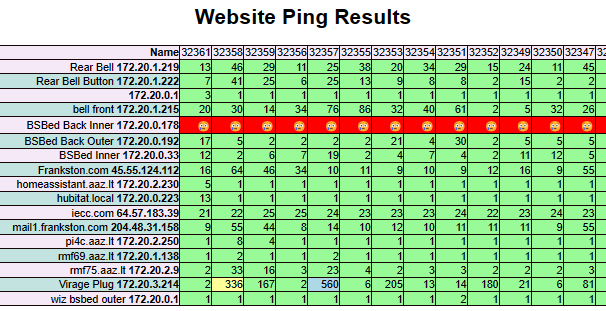
I’ve built a number of tools to help manage the system. One is a pinger that pings selected endpoints, local and remote to help identify problems.
One issue I’ve found is highly variable ping times though it’s not clear what is going on when it can take seconds for a message to get through but eventually it does.
More work to be done.
Banes
DHCP
I work hard to avoid using any static address (as well as no subnetting) because that’s why we invented computers. If you can manage your pool of addresses you’ve got a toy network. I’m reminded of people who debug a five line basic program and can’t understand why an operating system has bugs. Putting semantics in the IP address is the close cousin of subnetting.
DHCP is underdefined. I ran into this when some devices had _ in their names and would register just fine with DHCP but such addresses are not allowed in DNS names so busy box rejects them. DHCP is not really clear on which string are valid.
More importantly, DHCP is often paired (as with DNSMASQ) with a local DNS server. As I noted, this is useful because it allows me to have purely local devices and also, to shadow public names with local addresses.
I used to put semantics in the DNS names so that Ksink3 would be the name of the 3rd bulb near my sink. That is not scalable or managing so now I use the native (MAC) address or whatever the manufacturer chooses as the name.
I then manage the bindings entirely separately in my own database. In theory, this allows other mappings of names – topic I’ll write about below.
Since it is useful to able to use names like KSink3 I would like to have the option of putting those names in the DHCP/DNS too and it is possible in theory, but I haven’t been able to debug the code. What I really want is better binding management. This experience is part of what influenced my approach in writing about URLs that don’t expire (ForeverURLs).
Ports
I already mentioned them above but it’s worth listing them there as a reminder that putting semantics in the address is a very bad practice. The port number is not a first class endpoint but a subaddress of the primary IP address.
Border Patrol
Ideally you can connect to the Internet anywhere and reach any endpoint. Unfortunately, we’ve created a maze of twisting winding passages in a misguided effort to reproduce the village walls. We rely on the physical boundaries of an Ethernet to assume we’re among friends. An SSID preserves this topological dependency.
This creates onboarding problems because the default is failure. It fragments connectivity. I realize we can’t fix this overnight, but we do need to have an option for open connectivity for devices and apps ready for the real world. And we already have them – as when you use public connectivity.
Amazone sort of recognizes this in their sidewalk but they have created it as its own walled community. Thread is an IP protocol that creates a border around its LAN and thus loses synergy and larger connectivity.
Certificate Management
I have a program to automatically renew HTTP certificates even for devices that aren’t accessible to the outside world. The stick is to use an API to add entries to my zone file dynamically.
I don’t need to bundle certificates nor even preload them. My servers can run indefinitely and use the latest version of the certificates. I have a number of certificates for my public and private web sites including mirror beta version. If I switch the default binding for which is my primary server, it is transparent because the new server can present the correct certificate.
The service is that such techniques are not the norm. Why do we have separate ports for HTTP and HTTPS when one can detect the flag upon connection?
Tweeners
These are protocols which aren’t strictly low level Internet protocols but fall between low level infrastructure protocols and high-level applications. (Not that levels are the right paradigm but that’s a topic in its own right).
HTTP(S)
HTTP is a very useful protocol for APIs because of the vast amount of tooling and support. One major feature is that I can use it from web applications and directly control. I’ll get more into the home control and web app below.
One important use of HTTP is to host multiple services on my main system. An important feature of the HTTP protocols is that there is a host name within the header. This is far better than having to rely on port numbers for each application. I wrote about how I dynamically add new applications by name. It also enables me to do centralized smart authentication and distinguish between connections inside my house and external ones. It’s currently a very simple implementation but can be the basis for far more nuanced access control and trust management. The ping application above is an example – it’s a web app that is a front end to a backend server. This is how I implement applications.
Too bad HTTP isn’t symmetric – I can’t listen in the browser. I work around this with WebSockets, but that doesn’t work well when I share a single port among multiple applications. Instead, I have shifted to processing streamed HTTP responses so I can display data as I receive it. This is especially useful for applications like my photo gallery.
I figured out these techniques with the help of ChatGPT. One that is especially useful is the ability to use a single port for both HTTPS and HTTP and to dyn
More about HTTP and home control below.
Home Control
I despise the terms home automation and smart homes. Instead, a have a packet infrastructure that facilitates the implementation of relationships between devices and enables me to add capabilities.
I can be smart because my home isn’t smart and thus it doesn’t second guess me.
Design Principles
Resilience. The system has to be resilient with few, if any single points of failure. (Alas, I can’t avoid them).
Direct. Relationships should be direct whenever possible. I should be able to send messages directly from one device to another.
Decentralized. It’s not just that there isn’t a single point of failure, there isn’t a single system. I can write a standalone program (or use Alexa et al) to turn on a light and it is the responsibility of other applications to cooperate.
HTTP(S) and JSON bundles. When feasible I use JSON APIs. And not I build shims that allow me to do so.
Home Central and Why
I have a main program I use to manage devices and their relationships. I wrote the first program in the 1990s for X-10. What became obvious is that X-10 was a peer-to-peer protocol that didn’t require a central server and such a dependency would be problematic. I found that the user case was simple scripts such as shutting the lights off when the kids didn’t. Or assuring that the porch lights stayed on at night.
But not much more. Yet even those simple scripts were problematic. What is someone was up light or wanted to watch the stars without the porch light being on. This early observation made me think about why home control.
The answer is about embracing the powerful idea of separating relationships between endpoints from whatever is in the middle. Just as smart devices made us revisit the assumptions underlying the concept of telecommunications.
The telecommunications design point was preserving a wave from between two endpoints as a way of transmitting speech. The idea of a string between two cans is the same principle.
If you have a dumb switch and a dumb bulb, then it makes sense to just cut the power. But with smart bulbs and controllers then you want to send a message to a bulb which can do more than just turn it on and off. Once you see the value of sending a message, then you realize that you’re no longer tied to the wire as an artifact. You can place a bulb anywhere and just connect it to the nearest source of power and control it from anywhere.
The ability to script is a nice bonus. The traditional home automation approach is the reverse. It starts to look for what I call high glitz applications like automation rather than recognizing the simple idea of relationships independent of the wire being fundamental.
As I often point out, innovation is driven by simple utility rather than being tied to elaborate use cases. If anything, those use cases lead us to building-in mechanisms that are limited to that use case.
The goal is to focus on simple relationships. You press “on” and it sends a message to a bulb to turn on. Period.
Of course, the details may be complicated if you look closely but the key is architectural simplicity. This is the magic of effective systems architecture and factoring.
Thus, the way to get anything done is to make an http(s) request and you’re done with it. If you tell a light to turn on, then you aren’t sure about the status until you hear back. It’s possible for a single https call to return to actual result but that’s the exception.
One constraint is that a webapp much use https but most of the home devices do not support http. That’s an issue in its own right but it’s understandable.
The idea that the device in your home only work if a certificate is updated is not acceptable! The reason we’re in this fine mess is that the design point for the Internet is the web not device and security is all about matching names and you want the certificate to expire if the DNS name changes or is hijacked. An approach that isn’t tied to that design point doesn’t require expiring certificates. I wrote about an alternative – a community of devices using shared secrets rather than depending upon security perimeters.
While we’re out it, the idea of using separate apps for each set of devices and having to login is not acceptable!
Management Program
At the heart of the system is the management program. I rewrite it in August 2022 to set the stage for another rewrite by cleaning up and modernizing the code.
Part of this is moving towards standard handler for each class of devices. The intent is to use the same API for the main system, the web apps and shims.
At management program uses a database that contains information about each device as well as bindings. It also has a simple rule engine.
The primary purpose of the central system is to provide configuration information for the web apps. Initially all rule and complex requests were routed through this central engine but today the operations are generally done by the web apps sending direct messages to each device.
The Webapp
The Webapp is a PWA (Progressive Web App) which is installed on the local device (typically an Android phone) that I mount on the wall.
I first started writing it in 2010 and it has evolved since. It started out with a floor map, but it quickly became obvious that that was a bad user interface and named buttons would work better. The code itself started using call backs but I’ve largely simplified it to use async promises. It needs a rewrite, but it works quite well so that’s not a priority. If you press a button, it shows the pending state and then confirms when the operation was actually performed. You can go to a different floor or room using the blue buttons.
Clearly the user interface is showing its age and with modern CSS it could be a lot better.
For now, it gets the actual status from the central program listening for MQTT messages, but the plan is to have each device listen for MQTT messages itself to reduce the dependence on the central system. I just want to get the time to experiment and assure myself the overload isn’t a problem. The switches can stay mounted for months and years, so any memory leakage is a concern. There is no great harm if the central system is down – you just don’t see the status update, but you can still control the devices. It will show both the hoped-for state. Even if you told it to turn on it will show a sub-button for “on” so you’re not dependent upon the toggle state.
Some buttons invoke rules which act as groups. Thus if the main database has a rule to turn a set of lights, that information will be provided to the app so it can do it without sending a message to the central system.
When it does show states for a group of lights it will average at the value and show lighter or darker colors. Yellow is used explicit command. If the text is brown, it means that the state is just on or off.
Having a platform means I can add features such as getting a message when a doorbell is pressed and announcing that someone is at the door.
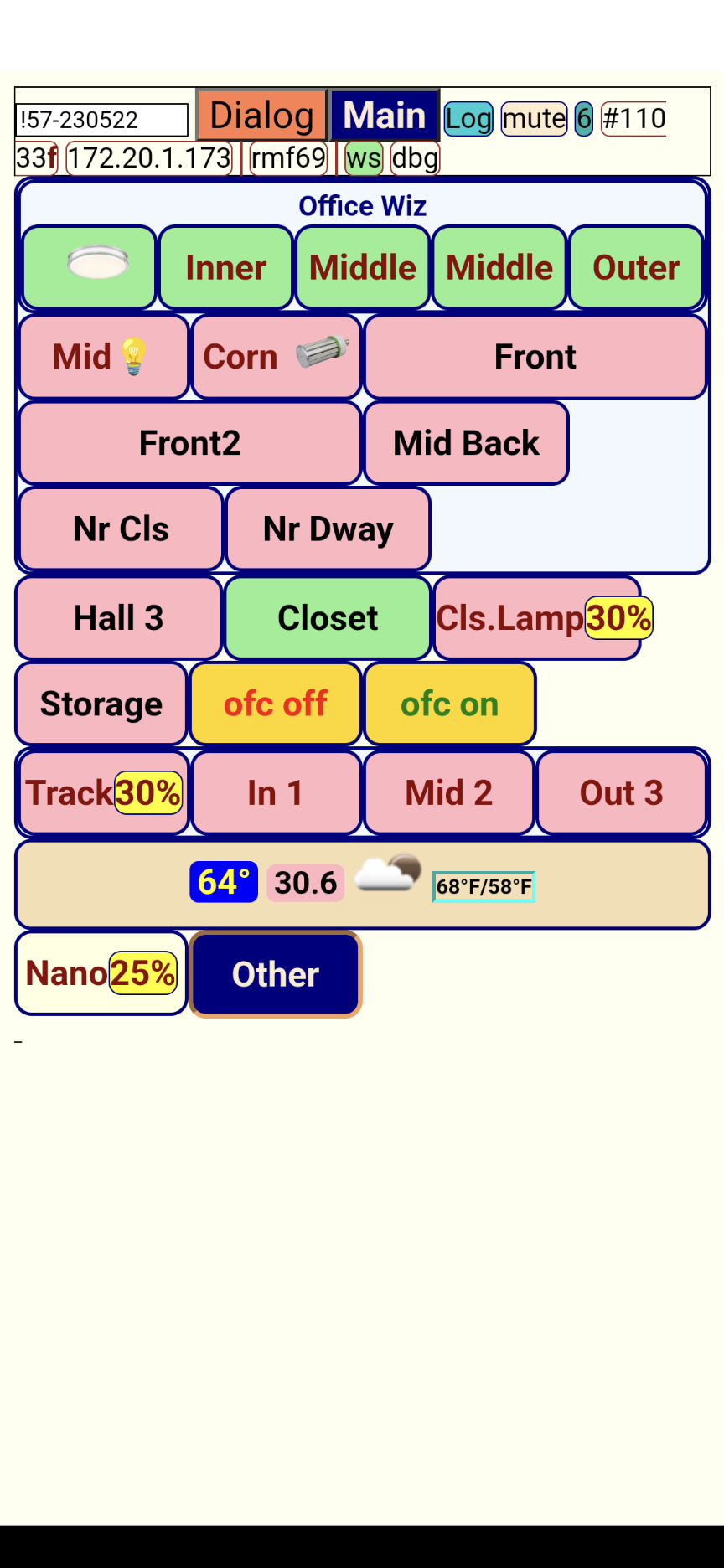
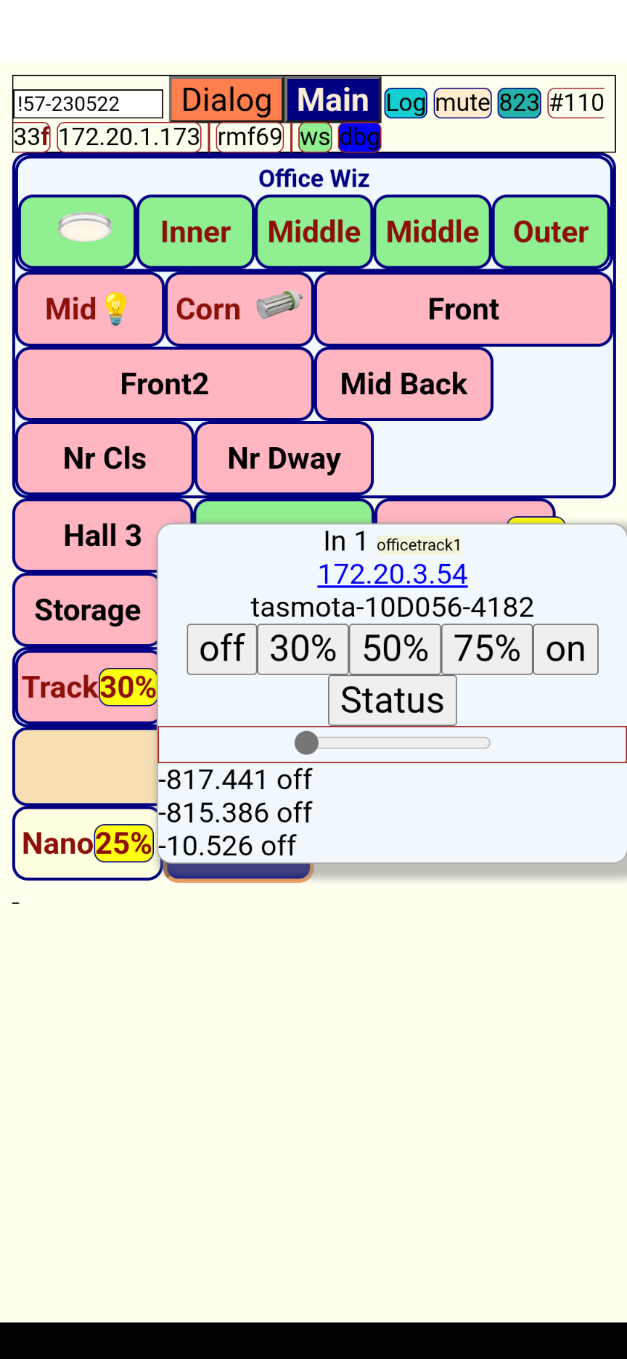
If you do a long press, you’ll get a dialog which provides finer control and, when possible, it provides the IP address of the web interface on the device itself so you can do operations not (yet) supported in the generic interface.
As per the requirements of a PWA all calls must be https… well, not really. One can use HTTP by telling the app you don’t care about getting a response.
 Not all applications have an HTTP interface. Hence the availability of a shim running on a number of devices (Windows and Raspberry Pi’s) that take HTTPS requests and perform the native operations. This is a key factoring tool so that the app can normalize everything to a standard information.
Home Assistant
My son took the plunge into Home Assistant and sold me on using it. It is meant to be a standalone platform for home automation. It is where scripts run, and it provides tools to create control panels.
It is sponsored by Nabu Casa.
I primarily use it as a bridge, so I don’t have to implement all my own drivers. Part of my design is to define a device and then specify routes so I can easily switch between paths such as between Hubitat, HA and my own drivers.
It was HA that got me to embrace MQTT because it’s centered on using MQTT. Because HA is designed to be its own platform it doesn’t easily yield the data but it is possible to access its database information directly through APIs and even by making a copy and using SQLite.
There is a large community around HA as well as hardware platforms you can buy for it.
Both HA and Hubitat provide bridges to other device families such as Zigbee and Z-Wave but, at this point, there are few devices I can’t find as IP device. The big exception of the older Philips devices that are available in a number of form factors.
Hubitat
Before I used HA I had moved from Samsung’s Cloud-based SmartThings to Hubitat which was essentially a version that runs within my house. I appreciate that they created an API so I could use it with my own apps. I also can listen for notifications.
MQTT
The Message Queuing Telemetry Transport is a fairly simple protocol that allows one to send messages with topic strings and subscribe to listen for them. Overall, it is a good model, but I hesitated to use it because there is a dependency on a single broker as the first point of connection.
Because of HA I finally gave in. The system design isn’t critically dependent upon the MQTT broker. Most things will continue to work fine.
One interesting aspect of MQTT is that the message formats are not defined. It seems you’re supposed to define message formats and naming schemes for your application. But just as I use the native identifiers for linkages in the DHCP, I use MQTT default message formats per device manufacturer because I’m not designing a closed system. I want to add devices that can have multiple relationships with other devices. Any special handling is in my listener.
Currently my MQTT listener runs on my main system (creating another dependency) but my plan is to put the listener into each browser client or, perhaps, in the shims.
Since the broker my crash I have a dead man switch to detect it and then power cycle the broker by sending an HTTP message to a power switch for the broker machine.
Devices and Device Families
Fortunately, there are lots of choices but it’s still early.
I’ll skip the legacy devices such as X-10 and Insteon.
Unless otherwise noted there is Home Assistant and Hubitat support for the device families though with mixed results
A brief rundown: (I’m putting a * for devices with built in HTTP web servers.
Espressif
I’m putting Espressif first because their chip is inside many of the devices. It’s a very powerful chip that can be bought for a s little as $2 mounted on a board supporting both Wi-Fi and Bluetooth.
I’ll also put in a word for Moddable which provides full JavaScript for such devices. There is no reason you need to muck around with C!
Shelly*
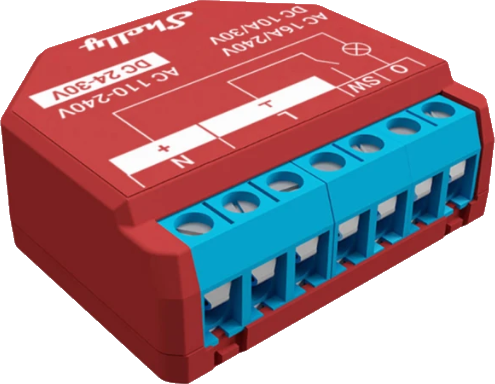 I very much like what they’ve done. It’s a Bulgarian company very simple and open devices that turn hardware into software. The devices support HTTP APIs using JSON and can signal using MQTT. They are very flexible and support a subset of JavaScript internally.
They have a line of products that includes professional devices. They are very hacker and developer friendly.
LIFX
This was my first successful foray into IP bulbs. They work reasonably though onboarding could be a pain. The protocol is HTTPS through the cloud and UDP locally. I implemented my own support (on NPM) and use my shim app to take HTTPS requests and control the bulbs.
The bulbs themselves allow me to set the names and assign them to groups. That was useful but, as noted above, I have now shifted to using native names and doing all the binding and grouping through my own databases.
They were pricey and the market moved. They were bought by the large lighting company FEIT. I’m concerned because such companies usually go trailing edge and don’t’ want to be annoyed by developers who aren’t “partners”.
Tasmota*
Tasmota is an impressive open-source product that can run on many devices that use the Espressif chip. It’s not as easy to use a Shelly but still quite capable.
ESPHome*
Similar to Tasmota and supported by Nabu Casa (the company behind Home Assistant).
Philips Hue
Philips Hue is my one ZigBee-based family or devices. They provide their own bridge with an IP/JSON interface and apps. I use it because they have a wide variety of form factors that aren’t available from others. A problem with Zigbee is that it needs its own relays to extend the range.
Philips Wiz
Philips joined the IP world by buying Wiz. I like Wiz better since it is IP based but the protocol is an undocumented UDP protocol but people have ferreted it out and it is supported by various platforms as well as my own support.
They are not developer-friendly and only want to work with “partners”. As with Hue, they do have some useful form factors.
Yeelight and Xiaomi 小米
These are related companies. Yeelight has some interesting fixtures though some only use 240v (so I had to amount a converter above the fixture). It uses UPnP protocol and documents the Interface.
Lutron
Lutron is an example of an outlier device that I can integrate using Home Assistant. They have nice wall switches so the flow is;
- Lutron proprietary to their bridge to HA
- HA then send an MQTT telling which button was pressed.
- My main system received the MQTT message and then sends a message to the process that implements the rules (using HTTP).
- The rule engine then sends out the appropriate commands.
What is impressive is that this all happened in a fraction of a second.
Matter
To be direct, I don’t like Matter. It repeats the mistakes of the past in having bit-based protocols over the wire and committee-based standards. It is closely related with Thread which is IP-based but has its own security perimeter rather than having nuanced trust relationships.
I’ll bridge to the Matter devices, but much disappointment is to be expected.
And More
I haven’t even gotten into Blink, Google Hello and Google Home, more about Alexa, Tuya and …
Design Principle
The challenge is to device a distributed system that keeps functioning even as it evolves. This is why I use HTTP(S) with JSON bundles both across systems and within them. The JSON can be sent as a query, in the body or even over MQTT.
Another key principle is idempotence. If I resend the same command, it will do the same thing. If an operation. This isn’t perfect, sometimes commands do get delayed and if I turn a set of devices on and immediately off the repeated ons may trip over the offs for a while.
Tooling
I have written a number of tools to manage and interact with these systems. Some of the include.
The WebApp. This is the app the runs in the devices. In addition to controlling devices, it has other capabilities such as forcing a reload. Future plan is to make it more capable and directly support swapping devices. Note the ap s works inside the and away though, in the latter case, it asks or authentication.
Discovery and Adding. The MQTT listen automatically detects new devices, but they can also be added manually.
Swapper. How many people does it take to change a light bulb? Just one command giving the old and the new. It automatically updates the bindings and notifies the webapps.
Management Console. I need to implement a management console that allows me to define the direct relationship between devices and then load the commands into the devices themselves, not just rely on web apps. I currently add the commands manually. For example, a Tasmota switch can send a http request directly to a Shelly switch. A control panel would manage the settings as direct relationships.
Whew
OK, this is already too long for most and I’ve only scratched the surface. On final observations is that there a tendency to rely on communities for support. The problem is that if this is to be day-to-day infrastructure you don’t want to hang out on forums when things work. If you do you’re either obsessed or annoyed by having to beg for help.
Related writings and Talks
Do this at Home A talk I gave to the Boston Lunix Users Group (BLU) in 2019
Home Control 2020 – This is a deeper dive with a lot more history but not edited.
a talk from to BLU 2023