


Table of Contents
- This is a draft
- Update
- Comments for the Reader
- Introduction
- Design Principles
- Today
- History
- Generation II
- Going Native
- System Architecture
- Evolving and Distributing
- Lessons and Principles
- Current Issues and Limitations
- Implementation Evolution
- History
- Data and Representation
- Languages
- More on VB6 🡪 VB.Net 🡪 C# 🡺 TypeScript
- Databases: Access 🡺 LINQ 🡪 ?
- Devices
- Home Entertainment
- Power!
- The Internet and Beyond
- Design Principles
- Architecture
- General Principles
- Resilience
- Idempotence
- Complementing
- Browser as the OS
- Reuse of Mechanisms and JSON
- Normalizations and Meta
- Evolution, Scaling and Binding
- Level and Edge
- Where is Knowledge and Compositing
- Frameworks?
- Trophy Homes
- Good Practices
- Onboarding
- Planned Changes
- Appendix
This is a draft
Expects lots of typos and other issues. Often, I leave out words like “not”. Oops. Notes
- Need to write about the doorbell implementation with illustrations.
- Thinking outside the network
- Discussion of dynamic DNS and ports
Update
In August 2022 I did a rewrite of much of the system though the basic design principles remain the same.
Comments for the Reader
When I started this essay, I planned to just write up the current state of my home system. In addition to writing this, I’ve been doing long-awaited cleanups and bug fixes on the home control software. The changes have significantly improved reliability (I think).
This document is a work-in-progress and, in the current form, will remain unpolished unless there is strong interest in a more organized version.
This is not for casual readers.
Introduction
I start out by simply describing the current state of my system. In later sections on focus on what I’ve learned and where I plan to go with these concepts.
I’ll admit that the primary purpose of my system is that it’s fun. But more important, it’s a chance to learn-by-doing. Towards this end, the emphasis is on agility and evolution rather than perfecting the system for the moment.
 I’m a software guy, so I want to avoid building specialized hardware and instead look for generic building blocks. That said, I’ve done a lot of my own wiring and do build some devices, but I’d rather focus on what I can do with software to existing devices – sometimes well beyond their original design point.
Supporting a 25-year-old program is interesting. I tried to write the program in a way that could come back a decade later and figure it out. For the most part, that worked but, sometimes, I’d get it wrong—more about that below.
 While it is interesting to drill down on all the concepts, the real significance is what we can learn from this.
Design Principles
The basic design is built upon similar principles as the Internet – interconnected devices with local intelligence (AKA, computing). This enables relationships to be defined using software rather than wires.
The approach also reflects the real world in being very distributed. The goal is for devices to have direct relationships without any single point of failure. The relationships are independent of the underlying physical topology to the extent feasible.
One flaw in the automation-meme is that the rules, even if they could be specified unambiguously, are very dependent up context (the place, the purpose, the user etc.) thus do not composite very easily. Even more so is when people with disparate interests and approaches share the physical space.
Another goal is to only use approaches that can, eventually, be adopted as the norm without complicated installation or management.
The caveat is that I am working with the building blocks and approaches that are available. Thus, for example, the current approach to issue security certificates is oriented around web pages so I have to use perimeter security for now and work around inability to use https.
One primary design requirement is to escape from silos. I don’t want to be limited to Alexa or Apple or others’ choices both in the devices available and what I can do with them. I avoid devices that only work in the silos though I do experiment with them and do use Alexa and Google Home for many purposes but, generally, not to control devices because managing relationships with hundreds of devices is too difficult in that world because there are no apps to help me. A bit ironic given how high-tech they are but it’s like the early Macs in which the learning curve hit a wall when you wanted to write command scripts.
Today
Overview

 I was surprised when I found I had over 200 Wi-Fi devices in my house but when you count up the number of light switches, light bulbs, thermostats, TVs, speakers and other simple devices the numbers add up quickly. In the kitchen there are 16 ceiling bulbs and that is not uncommon.
In simplest terms all the devices are connected directly or indirectly via a common local network using IP. Non-IP devices have their own gateways, or I use generic gateways such as Hubitat.
The light switches are smartphones running a web app. Because of the limitations of such apps, there is a shim program that listens for HTTP requests. That program is running on a number of computers – Windows and Raspberry Pi’s to assure availability.
They are coordinated using a central control program and database on my main desktop, but they work independently of the central system. The central system does play a vital role in listening for status changes and reporting them to each controller. The central system also allows control from outside my house because it listens to an external port.
The focus is still on simple on/off messages and levels (brightness). The next stage is to generalize this to support more capabilities (such as color) and to report more information (such as temperature).
This isn’t a limit on the house in that the design coexists with the myriad applications for each product line used.
Living the Smart Life
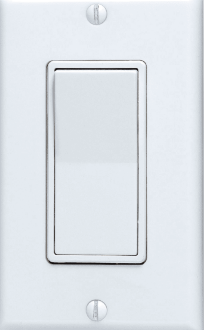 At a first approximation, the house isn’t that high tech. In fact, some of the switches look just like a traditional light switch except that there’s a controller behind the switch that can control a light and send a message. Instead of running a wire to each bulb, the bulbs are endpoints that can take messages, or for some bulbs, they are connected to controllers.
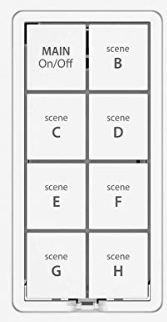
What is more unusual is that most of the lights (and other devices) are controlled by a web app in devices (smartphones) hanging on the wall. Sure, I could carry around phones instead but it’s nice to just enter a room and throw a switch or press a controller without having to fish 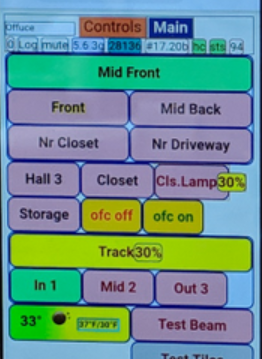 out a device.
While one can use Alexa et al to control the lights this hasn’t been a major use. Alex and Google home are useful for answering questions and performing other functions. But maintaining all the maps so that the voice commands work is too much trouble. It’s nice at first but the novelty wears off.
For visitors using the controls isn’t a problem. Unlike traditional lights switches the controllers are labelled and show what is really happening.
After a power outage, the system continues to function though some devices may have turned on by default and need to be turned off.
History
X-10
The project started in the 1990s using X10 because that was the only open and generic hardware platform available. All that X-10 did was turn switches on and off, and, for lights, it could vary the voltage. Companies like Smarthome extended X-10 with the ability to query devices so track the state rather than just send commands blindly. The key enabler was the ability to interconnect with X-10 devices using the serial port.
I chose Visual Basic as my implementation language because it gave me leverage and tools. This was especially important for Windows because it freed me from the complexities of the various native APIs.
X-10 didn’t scale very well and was a slow protocol. This forced me to avoid complacency. If I issued a command, I couldn’t be sure it had the desired effect until I got a response. The downside is that all the workarounds created pervasive complexity that pervades the code to this day.
The major positives of X-10 were:
- Low cost so I could deploy it freely.
- It didn’t have semantics beyond On/Off (dim/bright), so I could use it for any purpose.
- It could operate autonomously so my application would add functionality, but the house lights would work even when the program wasn’t running. This was key.
- The protocol was simple to understand.
- Availability of a variety of accessories
Of course, there were limits and downsides:
- Limit 256 devices (by using all the house codes)
- Slow and unreliable signaling which was a fatal limitation.
I did learn some major lessons. One was to reinforce my sense that I want to be in control but didn’t want automation. This was reinforced as a discovered that scripting wasn’t that useful except for limited users like turning the lights off at night because the kids didn’t but it also turned off lights when people were in the room, thus demonstrating the downsides of mindless automation.
The Control Program
I started to write the control program in the mid-1990s. It used a serial interface between the computer and X10 devices. X-10 is a peer protocol, so the control program complemented the devices but wasn’t required.
A key feature was the simple rule capability that would allow, for example, a single X10 command to control multiple devices.
Supported X10 did add complexity to the code. It meant supporting quirky commands like “all lights on for house code M”. Some of the complexity remains.
Insteon
 Insteon was the second family of devices I supported and was the start of generalizing my code to support multiple families of devices. There is still the X10 legacy in that the device families each have a letter, and the devices are numbered.
Insteon is far more sophisticated than X-10. Each device has a 24-bit address. The messages could travel up to three hops using both wired (power line) and wired connections.
When I first encountered Insteon was in a prototype stage build around a hardware interpreter with an arcane instruction set. It was soon wrapped in with an interface that would allow me to send and receive messages. The documentation for the message format was pretty good but with significant holes because, apparently, the designers didn’t realize their implicit assumptions need to be explained.
My biggest failure was to assume a standard packet protocol, so I had complicated code to match received messages with messages sent. Later I find that the protocol was synchronous with every message requiring a reply within a small number of hops. Unfortunately, the complexities that came from the very general design were not fully eliminated. The bigger problem is that such protocols are inherently limited to how far they can be extended.
The initial devices were designed for installers who didn’t have computer, so you’d hit set on one device and then press a button on a corresponding device. Writing software to setup links was a task in itself. It was greatly complicated by the bugs in the read/write record message necessitating a long series of peek and poke instructions to modify the device memory directly.
I was relieved when I started using a third-party interface which had its own limits, but at least it was no someone else’s problem.
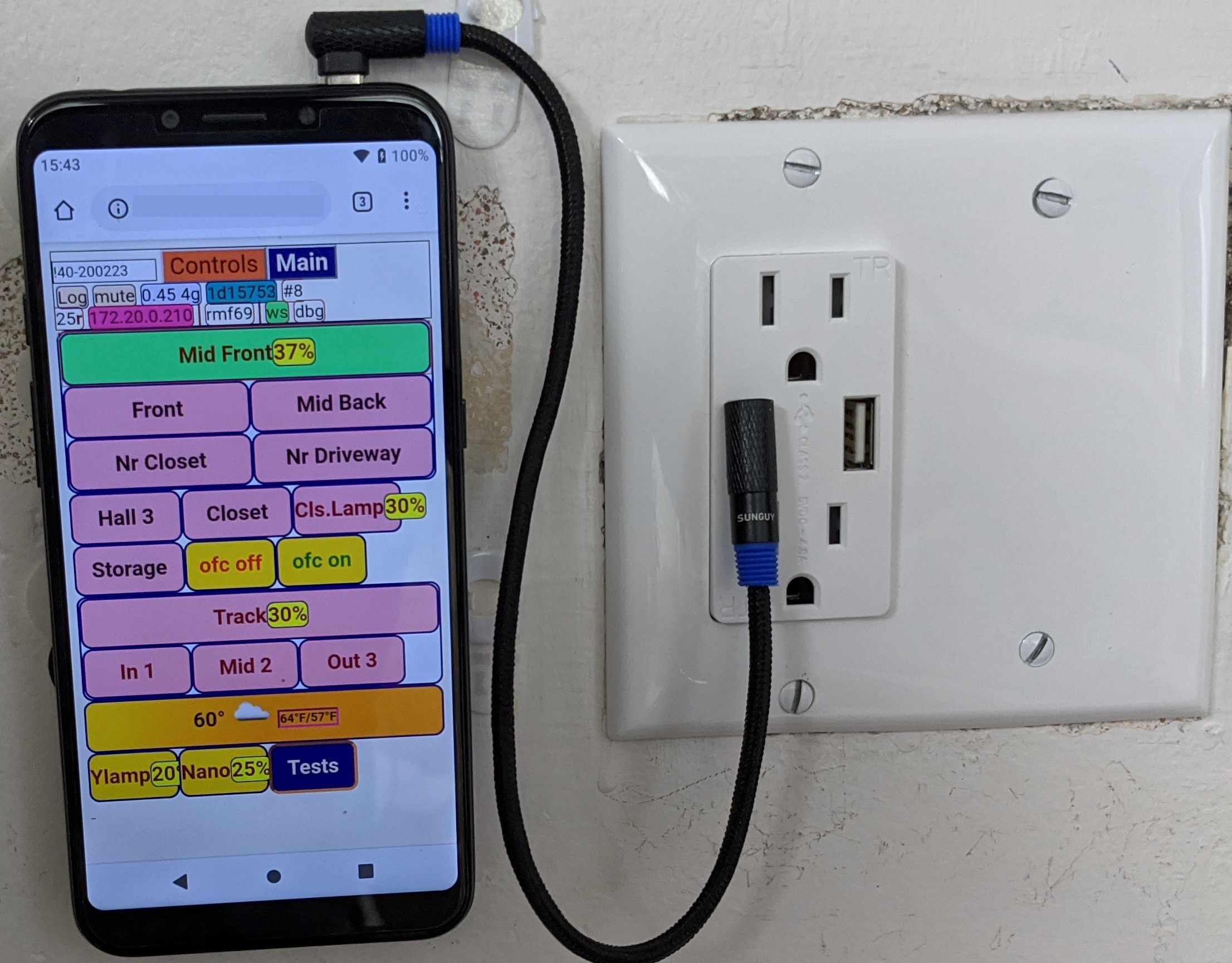
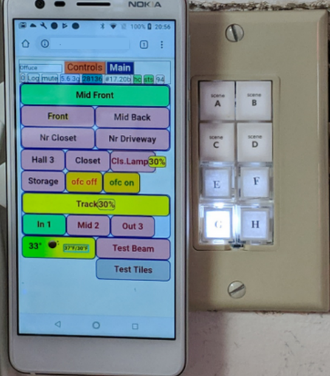 In the end (this year), though, I would up eliminate all my Insteon code and the devices except for a tiny number that weren’t worth removing. I’ve replaced most of the Insteon wall controllers with USB outlets that power the smartphones I use as controllers.
In the future I expect to have tape-on USB power cables to make it easier to install devices. I also want to mount the controller in the old switch boxes though the ability to just put a controller on the wall anywhere is very nice.
More on Insteon
The amount of mechanism I built to support Insteon was amazing and I learned a lot. I had to build a complete setup for linking and managing the devices because Smarthome didn’t provide any nor was there an API other than the problematic serial protocol to devices.
Eventually, they did provide an app for managing the linkages between the devices, which was immensely helpful though the knowledge of how it worked. It took a long time to provide network-based interfaces and, even then, they didn’t even document the most useful features.
They when shifted to more of a cloud-based solution like so may others that made it harder to work with the devices. Without APIs it required a lot of manual futzing and guessing. And they abandoned the desktop app.
I eventually shifted to using the Universal Devices interface which had an API but enough other issues that I realized I need to move on. Especially after the Insteon device started to fail.
Smarthome
In the early 2000’s Smarthome, the site from which I bought much of my gear, started working on a new technology – a major improvement over X10. Insteon® had some key improvements.
- The design is computer-like in using messages to control the devices. These messages could use wired (powerline) or wireless links. It was far higher performance and more reliable than X10 and could support many more devices.
- Each device has its own 24-bit address wired in so there can be stable direct relationships.
- There were (eventually) a wide variety of devices with great mechanical engineering. These included switches and sensors.
Initially, Smarthome seemed to be aiming to manufacture building blocks and license it to other companies but eventually had to do this itself.
The design reflected a hardware-orientation and marketing to existing installers.
My biggest surprise was that the protocol was synchronous – after I’d implemented an asynchronous implementation. There was implicit knowledge in waiting for the return message. This synchronous approach meant that one couldn’t extend the messaging beyond the three hops. The interfaces devices used a problematic protocol without concepts like escape characters so that an 0x02 could start a message or be embedded.
Device relationships were defined by a pair of records at the two endpoints with the relationships established by pressing buttons on the devices. There was no API or control software to do this.
I was forced to write my own, despite limits in the documentation. I found bugs such the failure of the read/write record operation in the first-generation devices. This necessitated byte by byte peeking and poking.
This led to enormous complexity and lots of software. Eventually they did provide a program to establish the relationships between the devices but no API. That program was decommitted a few years ago though I was able to get it to hobble along.
Eventually I went to a separate interface from Universal Devices which, at least, used an http protocol. But it had its own quarks and given the new devices available I finally moved away from Insteon earlier this year.
Generation II
SmartThings
As I was running into Insteon problems SmartThings became available with a usable interface for a variety of devices using Z-Wave and Zigbee.
The problem is that it relied entirely on a cloud-based facility, and the design point was about automation rather than the simple control. But I was able to write my own app that ran on their services that allowed me to use a simple API to turn things on and off and set light levels.
That worked reasonably well but sometimes I’d run into a bug and would see a 2000-line traceback from their Java code.
When Smarthome eventually came out with an update that worked more within the home it required a lot of effort to repair the devices because that’s the way the hop-by-hop protocols work.
The other issue is the use of OpenID which, in itself is fine, but trying to figure out how to do it was a pain. I found a third-party site (https://iotdb.org/) that helped me so I could obtain my credentials from there. Fortunately, when Iotdb.org went way I was able to move on.
I had to adjust to the SmartThings model in which each device has capabilities. You can see the same device as an on/off switch and also a colored light source. The access control is based on families of capabilities and devices are enabled within the families. This is annoying in that one must go to many places to provide access and then do it for each client.
This general capability did expose a glaring limit of my current code which was tuned to deal with lights and doesn’t treat on/off as orthogonal to the brightness. I also don’t support attributes such as temperature well, OK, not at all at the moment. Did have a special command capability for specialized Insteon support but generalize the status mechanism is a priority implementation task at the moment.
Hubitat
 I found Hubitat as a successor to SmartThings. Internally it’s a local clone of SmartThings that runs in a stand-alone box that costs under $100. While that is useful in attracting existing drivers that wasn’t very important to me. More important is that they wrote a simple API (perhaps for me) that made it easy to easy commands and the status of devices. The simple API also gives me the ability to get a message when the status of a device changes.
What SmartThings and Hubitat have in common is the ability to interface to other device families so I don’t’ have to do it all on my own. In addition to Z-Wave and Zigbee devices, for example, the have support for the Philips Hue, Nanoleaf, Yeelights (mostly) and more.
Going Native
There are still major advantages to my support devices directly. I’ve generalized the support for families of devices to support devices classes with SmartThings and Hubitat interfaces being treated as families.
LIFX
 LIFX is an IP-based bulb. The big advantages are an open API and high lumens. While there were some initial problems, they seem to have worked out most of the kinks though I am still concerned about the depth of their software skills.
There are two APIs. One uses http and is cloud-based. I started using that because it was simple and worked relatively well. I’ve since moved on to use their native LAN interface by modifying a package I found on GitHub.
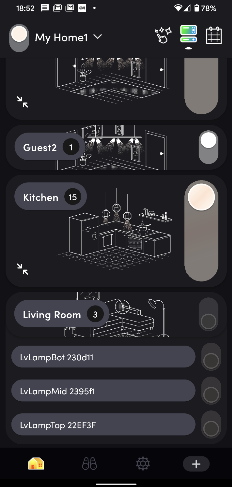 The API works well but the approach of using broadcast messages doesn’t scale very well so I have to program round that.
The other issue is that onboarding is annoying, and I don’t’ like the current generation of their app but having an app means I don’t have to solve all problems in my own program and can focus on adding value.
 A feature of LIFX is that I can use them for outdoor bulbs – something I hadn’t realized at first so I’m still using some Philips outdoor bulbs too.
One issue with LIFX is that there is no way to change the initial settings so when I reboot the house (by turning off the power) all the lights go on. But I can shut them using the app.
Shelly
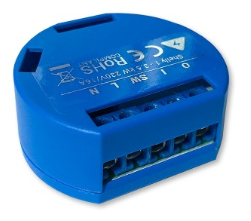
The Shelly (https://shelly.cloud/) devices represent a major opportunity for me. The basic devices – the Shelly1 – just controls a relay. This focus on the basic function of on/off was the strength of X10 and why it lasted so long.
Most important, though, is that Shelly isn’t trying to capture the value of the applications and provides a simple API. I can choose to rely on perimeter security for now though, eventually we need to move towards full encryption.
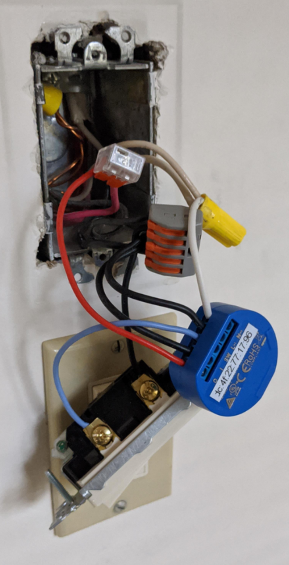 The company isn’t trying to do me more favors that I want – it just makes good stuff inexpensively. It’s about $10 for the unit. (A little more UL approval). I write about a use case in my recent column “Rewiring”.
The other feature is that it has its own web page for setup. I can use 12V or 110/220 and the real can control powerline or low voltage.
The devices support a number of protocols including sending messages so I can monitor for state changes no matter the source. This means I don’t have to control everything through my app.
As an aside, I also discovered lever-nuts and flexible wires as in this example where I place a Shelly behind a paddle switch and set a policy so that one position of the switch is treated as on.
Other Shelly devices allow me to dim non-dimmable bulbs, measure current, control low voltage RGBW LED light strips, bulbs (though not as many Lumens as LIFX)
These capabilities have allowed me to replace my Insteon controllers with Shelly and other devices with high performance and more resilience.
Nanoleaf
Nanoleaf started out making an LED bulb but discovered their true calling is decorative lighting. To my surprise this has been a success story – lighting as art.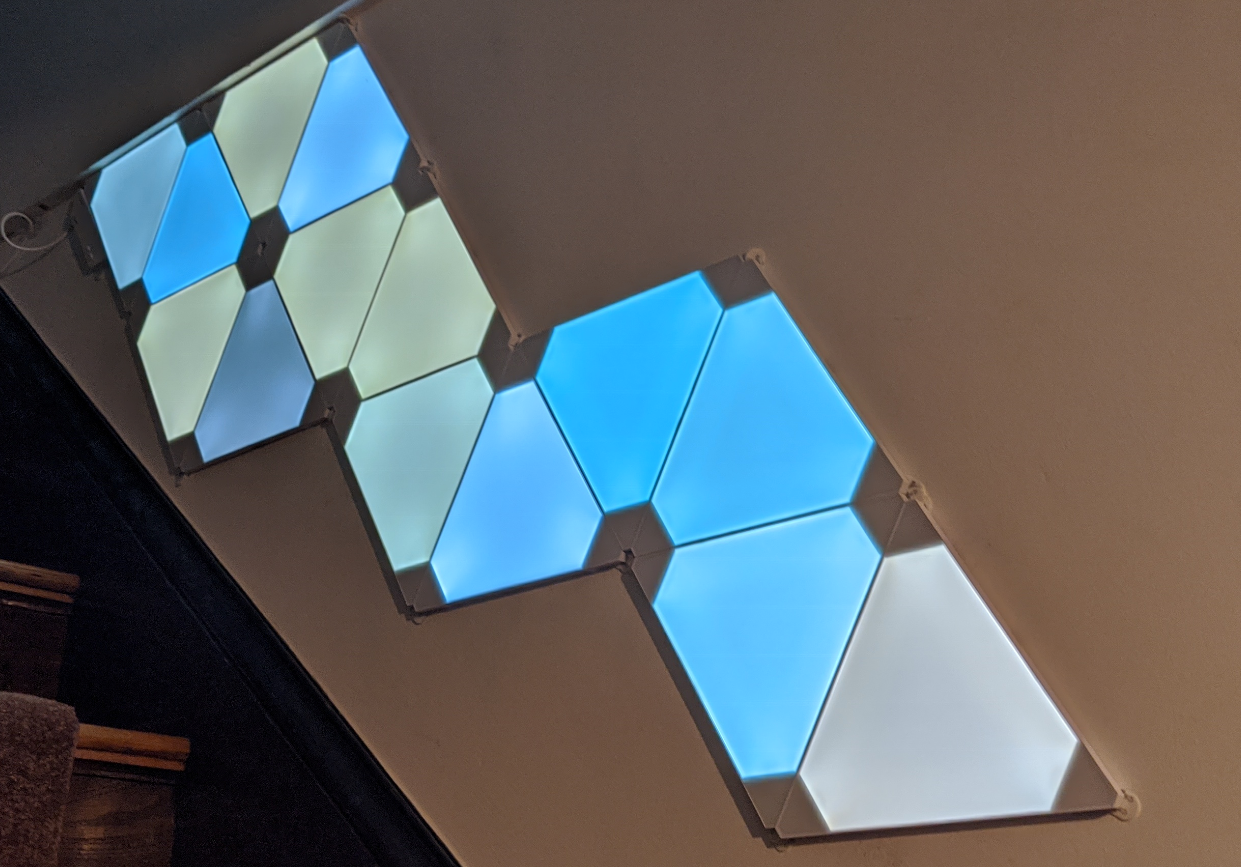
Unlike LIFX and Shelly, I control Nanoleaf through the Hubitat API as well as using their app.
The Nanoleaf API looks very good but is yet another project.
Signify (Philips Hue)
Philips Hue is interesting because they make lighting fixtures with built in smarts in various form factors such as outdoor lighting. As with Nanoleaf, I use Hubitat and the native app. There is a native API that I’ve experimented with.
Nest
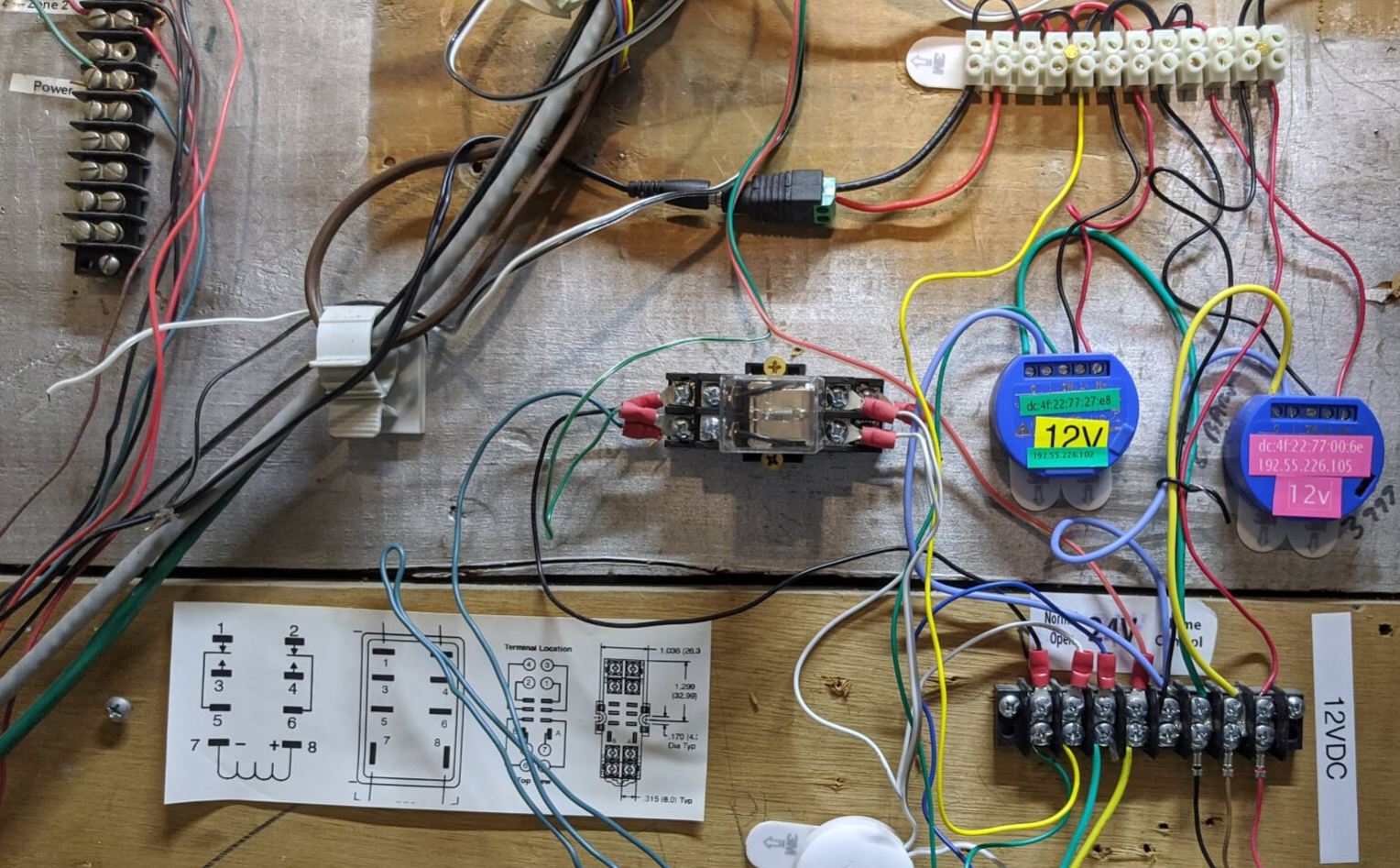
This is a disappointment since I hoped to use the API for detecting the doorbell and even unlocking the doors. Instead I convert bell voltage to a simple contact closure and use a Shelly to detect it.
See https://rmf.vc/IEEERewiring for using my Nest as a doorbell. Here is the wiring it took to take their AC doorbell signal and turn it into an event.
Others
No need to list other devices except, maybe Yeelight (from 小米) which has a number of devices though not all for the American market since they use 220V, so I have to have an adapter. I also have to some native support since the Hubitat support is limited.
Notifications and presentation.
Many of the current protocols seem to be defined for command and control. If someone turns on a Philips Hue bulb the other clients are not notified.
Notification is a new concept because traditional switches didn’t show the status beyond up typically meaning on but if you have a three-way switch then you can’t tell whether a light in another room is on or off.
 Now that I have a display, I want to show the current status. I also take advantage of this in the user interface so that pressing a button toggles its state. One positive legacy of the X-10 implementation is a trust but verify design point. Thus, after I send the on command, I display a secondary button so that one can perform the toggled operation even if there isn’t a response. In this case I pressed the pink (meaning off) button and white waiting for a response I display the secondary “off” so that I can still turn if off the state is wrong. Notice that this button also provides an option to light the bulb to 30%.
 If the bulb is fully on, it is bright green. But if it isn’t, it may be dark green or yellow depending on the brightness.
This is also true for collections of bulbs (or scenes) in which I average the level as in this example in which ceiling shows that most bulbs are on, but “all on” is yellow because it averages in other bulbs. “The ceiling” is that title for a subset of buttons – in this case, the three lights plus the collective “ceiling” button.
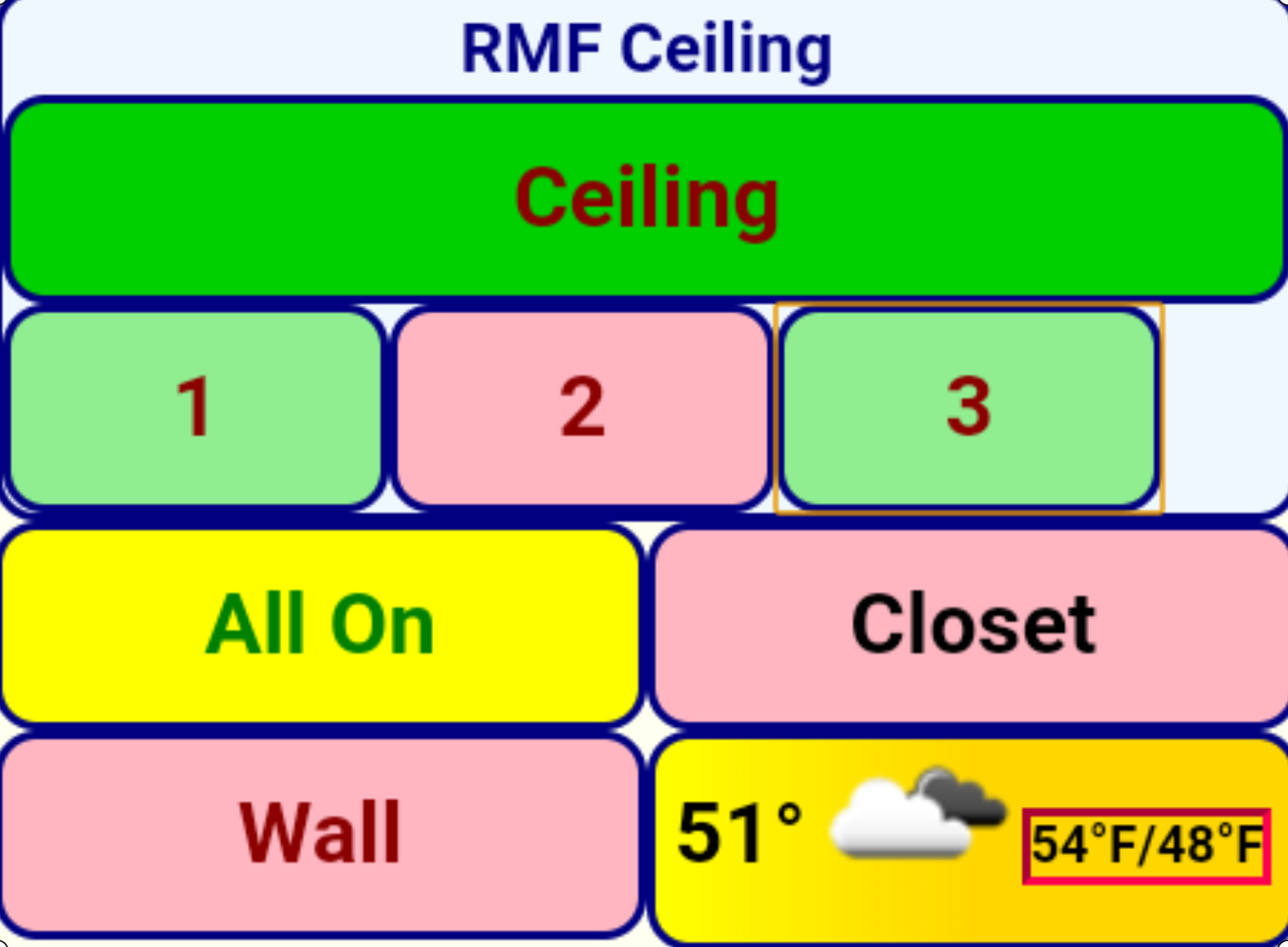
Notice the weather widget. The app allows the implementation of specialized views in addition to the customer buttons. It also allows for audio messages as in creating doorbell sound. Unfortunately modern browser suppress the audio capability by default until someone manually interacts with the screen.
Note that currently the devices report their levels as a percentage their own range. What I really should report is the actual number of lumens but it’s hard to get a proper measure because a light on a high ceiling is very different from one nearby, so these indicators have to be considered approximate at best.
Fortunately, nearly all of my current devices to notification. Hubitat will also periodically polling and provide notification for devices like Philips Hue. Philips Wi-Fi bulbs, the Wiz, do notification. Though I had to ferret out the protocols and thank the communities that have worked to discover how they work despite the manufacturers’ reluctance to expose them.
One problem with notification is the potential for a lot of traffic and chatter. When there is a change, I notify all my devices whether to not the data is actively displayed or is needed to process a local rule. I can optimize this, but it doesn’t appear to be a big problem on a gigabit network as long as I limited how often I do complete updates. Even then it isn’t obvious in terms of slowing down other traffic.
The devices themselves are sometimes chattery as in the case of the LIFX bulbs which seem to be overzealous in reporting their status. (but suffer from a problematic broadcast protocols).
System Architecture
Overview and Evolution
The current system is still evolving from the original program. The main components are:
- The control program that has continued to evolve from the original code with much still in VB and the newer components in C#.
- A database to manage the devices.
- The user control program – a web page or, more to the point, a web app.
- The shim for interfacing the web app to devices. The shim works around issues such as the lack of CORS (Cross-Original Resource Sharing) for some of the APIs
- Utility scripts running in Node to add functionality and to listen for events.
The major change over the years has been to greatly simplify the main control program and to distribute responsibility to companion programs.
The removal of X10 and most of the Insteon support was a major simplification. Though, ironically, the name X10 is still pervasive as the main data table is still called X10Device with different families of devices having their own linked table.
When I added SmartThings support, I also shifted to using a http interface for control. There had long since been network capabilities starting with a TCP command listener. When I generalized support for SmartThings, I also wrote the web app. Originally the app used the floor maps that I had experimented with but I soon found that labeled buttons was much easier to use though a limited version of the floor map remains.
Writing all these apps served a secondary purpose in helping me to learn techniques. The main control programmed started out using an Access database with lots of scaffolding. It now uses SQL Server. The new modules are in C#.
The client app had multiple web pages but now is a single app that generates the views. The original version sent all requests to the central app but now either controls the devices directly or sends command to the shim app running on various machines, so the house works even if the main app isn’t running. This became necessary with the shift to using web apps since it couldn’t go directly to devices for the most part either due to the lack of an API or the CORS limit.
In addition, there are auxiliary programs running under node and written in Typescript
- Homer which watches devices and provides a command line interface. It also assures that devices marked “keep on” stay on.
- A separate app to keep porch lights at night but this may be moot since I set the Hue lights to do it themselves. This part of the larger issue of where to place what smarts which I’ll get to below.
- Two watcher apps. One watches events from the Shellys and another for Hubitat (they will be combined at some point) and then report it to the central controller to be dispatched to other devices.
- The shim app running on several devices to assure availability
- And web app in each smart device mounted on the wall.
Networking
This is an aside but useful to know.
I’ve had a home network for decades and even have my own class C network. Having 256 addresses seemed like more than enough.
Supporting the LIFX bulbs and FiOS 150Mbps service forced me to shift from my ad-hoc network to something more organized. LIFX bulbs required the same SSID be available throughout the house and 150Mbps required upgrading my network a Wi-Fi on testing the speed of my network showed I wasn’t getting full performance.
Ubiquiti
I choice Ubiquiti gear with Unifi after doing some experimenting with other approaches including the command line gear from Ubiquiti. While I’m not comfortable being overly dependent upon a single company’s software it allows me to focus on using the network.
I have four APs throughout the house and use their managed routers. It works fairly smoothly as I’ve become more adept at using it. An important feature is the VLAN (Virtual LAN) which enables me to share the physical network while I experiment with other gear and a backup Comcast connection. That’s a story in its own right.
I’m also concerned with the lack of a published API, but I do use Apps that ferret out the information I need to track devices. I rely on Ubiquiti to provide me with a table off all devices so I can map MAC addresses to IP address.
In the future it shouldn’t be necessary to manage a network but today I need to.
I am concerned in depending so much on their services - -the access points and the DHCP service. For now, I’m using UPS (Uninterruptable Power Supply) for those key components. If I power cycle the house, I can reset the devices while keeping these core services available.
Alas the use of Wi-Fi means depending on the access points. At least there are multiple APs.
I’m concerned with the degree to which I depend onb the smarts of Ubiquiti but, at the same time, it’s also empowering. Since I started writing this document, I discovered how to use Ubiquiti’ USG (Ubiquiti Security Gateway – a misnomer)’s built in DNS capability. By making it my default DNS sever I can shadow the public DNS. One point of failure is that when I used a DNS name, I got the public address for my system and if that connection wasn’t active then I couldn’t access even local devices. I now get a local address when I query my host name inside the house so I can use the same name inside and outside but get the appropriate routing. It also means I see the real addresses of the devices instead of the forwarded addresses. This is a major improvement.
Since I have multiple APs (Access points), I’ve reduced the points of failure though the USG is still a single point of failure but at least the external connection isn’t necessary within the house.
I’ve also completed a transition from my personal address range (which I own but had to extend once I had too many devices) to a standard private network range. This forced me to shake out dependencies upon specific IP addresses and static address. The ability to use a DNS shadow for local addresses meant I have very little need for static addresses. In the process I discovered address “droppings” that came to bite me. They were expedient but accumulated.
There is still a dependence on SSID and, so many Wi-Fi devices I can never change it.
One downside of Ubiquiti is that lack of an API for Unifi – the control program with the GUI interface. Fortunately, people have ferreted out a pragmatic API that allows me to access the data for applications such as MAC🡺IP and for discovering new devices. I’m also leaning the command line interface which can coexist with the GUI.
I’m very wary of my improving expertise because I see what I do in the context of what normal users can do but it is necessary for me to drill down so that I can understand what happens once we make the simple cases easier
IPv6?
There is a problem with the Internet – we don’t have enough IP address to assign each device a globally unique address. IPv6 should be the answer but it doesn’t provide stable addresses. In theory it should eliminate the need for address mapping without a house because I can get enough public addresses for every device.
But, within my house, the ability to use the Ubiquiti DNS as a source of stable names gives me much of the power of a link-local address in IPv6 without tying me directly to the MAC address so is more flexible.
It would still be nice to have the devices have public addresses, but we need to work on the protocols to allow for managing trust relationships. I discovered that when I do use IPv6 my printers are suddenly available to the world. It will take a while to work this out but the workarounds we have to extend IPv4 may be a better starting point for relationships independent of the particular network topology.
Maintaining a TCP connection from the device outwards is a kludge but, architecturally, it is more in the spirit of the Internet’s end-to-end principle than depending on providers for stable addresses.
So, while IPV6 is useful and for applications, such as cell phones, even vital, we may quickly evolve past IPv6.
A caveat. This morning I found that many of my devices weren’t getting their IP addresses and other issues. I finally tried rebooting the house (powering the main breaker) which resets everything except the APs, the USG and some servers. It only started working when I power cycled the cloud key? Why? I wish I knew. Another reminder of “don’t try this at home” unless you’re ready to deal with this.
Onboarding
I’m including Onboarding as a network issue – at least the portion of onboarding the requires connecting the device to my network because I can’t communicate with a device until it is connected, and I can’t connect until it has an address.
One simple approach is to have the device come up as an access point. This is the approach used by Shelly – the device is available by name and I can find it on my phone. Once I connect to it (and assure Android that it’s OK to keep the connection) I can get to the setup screen (a web page) using a standard address. Once I set the SSID (and password) I can find it using Ubiquiti.
Evolving and Distributing
From Central to Distributed
In the initial design all operations went through a central event queue as actions. The code distinguished between actions and status but the distinguish between “on” and “turn on” it subtle. More about that later.
As part of this devices can have observers which could be scripts, code or rules. The need for explicit code went way with the shift to dotNet and the more general capabilities. Scripts were originally in separate dotNet modules but are now don’t using NodeJS.
The rules were meant to be a powerful facility but only the simple rules were implemented. These had a trigger which was a device or action name and a condition such as “any change” or “turn on”. There was then an action which took a name (device or action) and what to do including “pass through” or “off” or a “level”.
Actions were listed explicitly until I realized that any set of rules could be considered an action so no need for a separate mechanism. Actions could also be script names but that evolved to rules that triggered scripts.
One other interest aspect is that a set of rules that passed through actions was also a group. A rule “kitchen” would trigger whenever a kitchen device was turned on or off. There was no device, but kitchen could be treated as an action and all the devices that were triggered would respond. This is the same as a scene which neatly folds the mechanisms together.
The development of the web app required an http interface to the main control program using JSON. This interface would be used for query for settings, but the main use is to send request to the central program. The request could be an action like “turn on kitchen”.
It could also be “kitchen is now on”. This ability to report the actual state was a key feature first introduced for X-10 since just sending the command was unreliable so I couldn’t assume a light was on till I got conformation. This has evolved into a reporting mechanism so that I can learn a light is on from any source and report it back.
The JSON command bundle can be sent a number of ways including using a TCP stream and, importantly, using WebSockets. The WebSocket interface allows the web ap to listen for status changes. This means the central program is a clearing house for event information.
The web app works without the central program but may not get the status changes.
The Web App
As noted, the web app has evolved from showing a house map to dynamically generated controls – typically buttons. Each one is labelled and shows status. A long press (or right mouse) brings up a menu with additional options including a level slider.
Each room has a standard set of controls, but one can go to the main menu and reach any of the pages. A # is used on the URL to indicate the current room. This allows the URL to be saved on the desktop making it easy to get back to the appropriate page
Originally the code was written using promises before the async syntax was available which made the code a harder to follow at times. As an aside, async has gone a long way to improve code style.
The big change was to shift from sending all commands to the control program to operating locally and sending commands directly to the devices. This isn’t always feasible, so the shim was added to get around the limits. There was knowledge of how to control each family of devices. When possible, a command is sent directly even if the CORS limit is present and then the device is queried via the shim. For LIFX the native LAN protocol is implemented din the shim since it a low-level protocol.
One interesting capability is handling groups. As mentioned above a set of rules with the same trigger forms a group. There can be a button in the web associated with that group just like any other device. The web app downloads device descriptions, so it knows how to send commands to the device based on which family it is.
A group is just a list of devices so the local app can simply send commands to all members. Recently, I realized there was a serious bug because some rules didn’t just pass on actions. An example would be turning on and off all lights in a bathroom but only wanting to turn the heater off when there’s a group command but not turn it on as part of the group. This meant adding a new device class for those rules so that the policies could be enforced.
Each button shows feedback with pink for off and light green for on. The level is shown using dark green and yellow. Group devices are handled by averaging the level for the members based on the status messages received. There is lots of local computing capacity available for this purpose.
By default, if a button is off (pink) then pressing it sends an “on”. But just in case an explicit “off” is added so that one can turn the light off even if the state reported isn’t correct. There are also overrides to force a command such as “on”, “level=30”.
One other capability is the widget button which can be used to show the weather or the time or whatever else is useful.
Another capability is listening for a doorbell message and making a loud sound. There is the potential for additional scripting and generalization of the mechanism in future.
The are other latent capabilities such as showing different configurations on rotation.
Ideally, the web app would be a full-blown progressive web app, but Google enforces a rule saying that web apps must use https for local connections as well as remote ones, and the certificate mechanism doesn’t work well for local devices. This is frustrating and needs to be addressed.
The app itself uses standard modules. It used to use a packager, but advances in module support limited the need. One downside is that if something fails, there is no error message. So, the app starts by loading a subset so that the user can revert an earlier version if necessary.
The Browser App
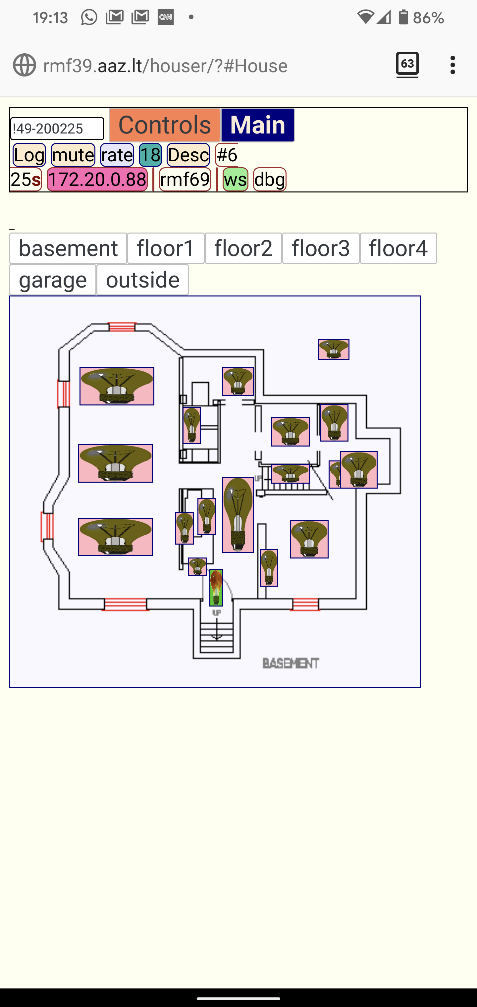 I started writing the browser app when I added SmartThings support. Initially there was a separate desktop app that for the new devices because I was experimenting with how to implement it. The browser app itself used a map I had built of where the devices are that I used in the desktop app.
It soon became obvious that the graphic representation wasn’t that useful and instead went to the buttons you see in the other illustrations though the schematic interface still works even if not maintained. Moving the positions might or might not work.
The implementation evolved as TypeScript and HTML5 evolved. It went from having pages to being a single “page” app. As native module support improved the implementation became simpler. One aspect I am proud is my pre-loader that always works because it doesn’t use any of the browser features so that it can report when there is a failure instead of just sitting there.
Unfortunately, I can’t (yet) make it a true PWA (Progressive Web App) that resides locally because of the problem with getting valid local certificates to it doesn’t depend on a server for first loading.
As with the rest of the system the app evolved. The initial implementation was focused on device presentation on the map. It was also before the async keyword, so event handling wasn’t straightforward. The use of TypeScript was vital in allowing the design to continue evolve and be refactored.
The communications to the main system is primarily through WebSockets in order to be able to get status messages but the same message format can use http as a backup and, on the desktop, TCP. Similarly, the status message format is common though it needs to evolve to be JSON and to support more than light information.
On big change was the addition of handlers to communicate directly with the devices either using http when the works or else via the shim. When commands are sent the app checks for status changes but otherwise status reports must come through the main system.
Other features including the ability to have widgets (such as the one showing the weather) and even special code for some events such as the doorbell. (Browser-permitting).
At some point I want to incorporate the shim functionality into an Android app but that’s a project in itself and more to maintain. The shim works well so it’s not a priority.
As with the rest of the system, the browser app can use a complete rewrite though there is still room for incremental improvements with a far improved UX and, perhaps, using the camera for gestures and to detect approaching fingers. Perhaps more use of voice. 3D packages can also help with a more dynamic interface. The map view can automatically zoom in so that it becomes more usable. So many possibilities …
Lessons and Principles
Learning by Doing
This is the live control system for my house, so I have to keep it working all the time. This consistent with my basic design philosophy of always having a working prototype. This limits bold changes but provides immediate feedback and learning.
One negative consequence of resilience is that the system works with even severe bugs! This is good for day-to-day living, but it means I may not even be aware that something is failing
Current Issues and Limitations
I’m currently thinking about the next implementation. Today’s implementation has a number of issues:
- There is still a dependence on the central system. It’s the only way changes get reflected to the nodes.
- Because of the inability to do a true PWA the central system as a server for the website. I’ve purposely made it, for the most part, a passive server so that one can pick up the client files even if the main program isn’t active. It also means that I can mirror the control program on a backup system. Implementing automatic mirroring is a to-do.
- As noted, we only track lighting now. Need support for other data.
- The current shim has evolved and should become a full flagged interface in the same way that Hubitat is.
Implementation Evolution
History
The system is about 25 years old so it’s interesting to revisit design decisions and think about the approach going forward. While it would be nice to reimplement the system from scratch it wouldn’t necessarily be much better. One reason is that it’s remarkable how much I’ve been able to evolve the code and, on the negative side, how much implicit knowledge I would have to rediscovery.
Perhaps most liberating has been the move from the static typing approach in VB and C# to the more dynamic world of JavaScript/TypeScript with JSON. I’ve also been happy to discard some clever, if not brilliant, code, in favor of simplicity.
Much of the complexity of the code dates back to the limits of VB6 and, later, early version of dotnet which lacked many of the features of the current implementation, so I had to implement my own crude versions.
Data and Representation
There is a contradiction between a very decentralized system without a single control point and a central database. In practice the two are complementary with the database being one view that complements the external devices. When the system starts up it gathers the current state of assures that the database is updated to the current reality or, at least, tries.
It should do this continuously and that is one cleanup. Initially it did recompute the configuration on a change without needing a restart but, for now, restarting is simpler. There is still a periodic refresh that queries the current state of the devices. This was started with X-10 when commands were often lost because of unreliable signaling. Today to allows the direct control of devices with apps to coexist with the control program that has to track others’ changes
The initial database used Microsoft Access via the native API. It evolved to use SQL Server with LINQ. One major design assumption was that access to the database was slow. I’ve since learned that I can do updates in a small number of milliseconds and have been cleaning up the code to reflect this.
The original design had an object (and a corresponding database record) for each X10 device. In fact, that base table is still called “X10 Devices”. When adding Insteon support I anticipated other families of devices so added a extension to the main object that for each family of devices. The challenge now it so rediscovery the commonalities and have less per-device.
As noted above, there is also a need to rethink the “action” object and the “status” object that tracks and reports attributes as I move beyond a focus on lighting and on/off to include other attributes.
The approaching taken by SmartThings in exposing a device as various capabilities has some merit but a bulb that is both on and off and can display various colors are treated as two devices. I plan to take an approach which maintains the concept of a device but manages attributes.
There is no single approach. Once we use software to define devices and have functions that cross devices things become more interesting. A scene is simply a virtual device. More interesting is the question of where the knowledge is. Does a bulb know it is part of a scene or is that held by a separate controller? What about a more abstract concept of “light up this room using whatever sources are available”. Things become very interesting very quickly.
Languages
As noted, the program evolved from VB6 to dotnet with the bulk of the code still in VB.net and newer modules in C#. The two languages are very similar with newer features being only in C#.
The earlier versions used lots of threading and locking. Async is a new programming paradigm in JavaScript that reduces the need for locking. It is also available in dotnet but retrofitting it in existing code is quirky.
The big shift is to JavaScript/TypeScript which is a very different style – one that feels liberating since I don’t have to carefully construct classes. There is also the shift to browser-based programming.
The problem is the need for parallel data structures for dotnet and JavaScript. The good news is that libraries make it easy to use JSON to move data between the environments.
The downside is the need for parallel implementations and splitting operations across multiple environments:
- The main control program implementation
- The browser version
- The shim program implementation that complements the browser version
The good news is that there are simple APIs for many of the operations making it easy to do multiple implementations but there is still a difference between the control program data models and the one in the browser app.
One shift is to take advantage of the shim code to treat it as a first-class API on a par with Hubitat and other normalizing platforms. This allows me to take advantage of the npm libraries for node and to share a single implementation across both the desktop and browser implementations.
Support for LIFX is a good example. Initially I used their https API but once I had done my own implementation of their LAN API (based on prior JavaScript code) I shifted to using the local protocol though onboarding still depends on their cloud server.
More on VB6 🡪 VB.Net 🡪 C# 🡺 TypeScript
A caveat – while the issues raised here were mainly drive by the home control app because of its nature as a real time interactive program I’m blending in some learning from other projects.
An aside on the evolution of programming tools. I chose VB6 for my initial implementation to avoid the complexities of writing C code in Windows. But it meant accepting many limitations on implementing classes, methods etc. The shift from VB6 to VB.Net was liberating but took some getting used to. I have a JIT (Just-in-Time) learning style which is why using new features in a practice application is the best way for me to learn.
The style is, well, eclectic in that rules for the use of upper/lower case, for example, are ad hoc. It didn’t matter in VB but, annoyingly, C# and JavaScript care a lot but since the naming conventions differ while the local code can look remarkably the same, I don’t bother fighting that battle and rely on tools. This is an issue with names since for strings there is no checking and if I use intracaps (as in OfficeNrCloset) there is no way to enforce checking to so I try to make dictionaries case insensitive and, in JS, use toLowerCase() a lot.
The other aspect is res ipsa loquitur which is a legal term for “the thing speaks for itself”. Whenever possible I try to make the code obvious rather than rely on comments so that I have one code base to maintain. Comments are just another codebase with humans as interpreters. I also try to rely on short names and local context to figure out the meaning. This isn’t perfect but does allow me to evolve the code over decades though, alas, use of English words like “action” are, by their very nature, ambiguous. Adding comments won’t necessarily help since they may be unambiguous when I write the code and then lose specificity as the code around it changes.
Once I’ve internalized the features it’s often hard to remember how non-obvious the concepts were. For example, In VB6 much of the windowing mechanism was hidden and automagical. With VB.Net far more is exposed but there was also a lot of work to maintain some of the VB6 artifacts including automatically creating a single instance of form (AKA a window). Among the challenges was serializing the events in a heavily multi-threaded system. I used queues for this purpose including a central queue for actions. The initial design assumed a queue back from the device handlers but, in practice, the status messages come back independently by updating the status of the device objects, by getting http messages and any other methods. Thanks to idempotence the various ways of reporting status work in concert.
When possible, I’ve shifted to C# and learned the new idioms but VB.Net and C# are roughly equivalent though there are quirky differences.
As part of trying to use the power of the languages I tried to work with the type system in defining various status messages and runtime discovery of types.
One part of this was the effort to allow the additional of scripts that could be invoked on events. In order to make C#/VB act like scripting languages (I’m using the term loosely for any code added dynamically) I’d invoke the compiler dynamically and then link to the new code and provide callbacks to the man applications. I could do this for various languages, and it was, if I may say so myself, impressive. I also took advantage of mechanisms like generics and extension types. Admittedly some was because I could but also to keep the code clean. For example, in getting an attribute from an XML object I could use an extension to avoid testing to see if the attribute was present in the right format.
Over time C# evolved as with the addition of generics. The XML support also was greatly improved and simplified. The other libraries for file handling, networking etc. all improved.
The bigger transition, however, was to TypeScript. I say TypeScript because I rely on the IDE rather than manuals and TypeScript just makes it easier. The initial use of TypeScript was for the browser app which made HTML (and WebSockets). TypeScript has also evolved (along with JavaScript).
I find that for the work I do the casual style of JavaScript makes life much easier and it is forgiving. While some bugs might go undetected that’s fine because the failures are soft and not the unforgiving all or nothing of C# and other languages of its ilk. Having good debugging tools helps a lot. (Though I miss the very smart debugger for dotNet which allows me to change the code on the fly).
JSON is a major capability. While I do use JSON increasing in the C# code (using the Newtonsoft Library) it shines in TypeScript. Instead of going through a complex type discovery system I can simply go to a field in a structure and use it. C# goes through gyrations distinguishing between fields and properties and between classes and structure whereas I don’t worry about this in TS. Partially because for what I’m doing the efficiency possible in C# buys me nothing but also because, with a smart runtime and better code, I don’t necessarily lose anything.
I’m planning to shift from the current notation to make more use of JSON for exchanging status messages and the like as part of adding capabilities for other data such as temperature and color.
The other big idea is single threaded asynchronicity. While did have a callback mechanism I always considered it clunkier than using threads. But threads require complex locking to manage the queues and some of the dotNet libraries are not happy. The GUI user interface, for example, is only usable from the main thread.
The big change is the async modifier which allows me to write asynchronous code that reads roughly like synchronous code. These same features are also in C# and, in fact, are for more sophisticated in the dotNet world and that’s part of the problem.
Writing in TypeScript is simply simpler for the normal cases and there are libraries that contain the complexity. Again, the NuGet libraries provide this in C# but it’s playing catchup at this point. One example is the handling of files in C#. I still don’t know how to distinguish between a OneDrive file and other links whereas the NodeJS library makes it easy.
Oh, NodeJS, that’s the key. It allows me to use TypeScript as just another desktop language. See https://rmf.vc/IEEEBlinky for my foray into device programming and, alas, Windows IoT. I’ve learned a lot since including shifting to native Linux for the Raspberry pi.
NodeJS gave me the scripting capability I wanted on the desktop without all the complexities of using dotNet as a scripting language. Having added http calls for the browser I now use them to communicate between the separate scripts or apps.
The other shift is from using Visual Studio to manage a main app with many modules to using Visual Studio Code that has a lot less mechanism – just files. Things can go wrong but they are far more visible.
At this point I can do a completely rewrite of the main code in TypeScript with NodeJS when I finally stop trying to do incremental improvements.
To give an example of how I use NodeJS, I have a simple app that watches for events from the Shellys and, when there is a change, it does a GET to send a report to the main module. The script does run on my main desktop but can run elsewhere. There are some other watch scripts.
One key module is the shim app. It started off as a shim invoked using http from the web app in order to perform operations that were not available to web applications but now has become a way to bridge to other device families.
In the future that bridging app will take over the functionality of today’s central program.
Using node makes it easy to write utilities and auxiliary apps.
Databases: Access 🡺 LINQ 🡪 ?
I’ve been working with databases online going back to the specialized system we had on the SDS-940 in 1966 and the first relational databases I used in 1969.
I initially used Microsoft Access to manage the devices and their state. Access was well-integrated with VB6. When I shifted to using dotNet I had to do work to create intermediate code to keep make it easy to work with the database tables. I could automatically read the data descriptions so I can easily access the data from the code.
LINQ is Microsoft’s integration of databases into dotNet. It was well-done in that it wasn’t limited to SQL. The problem is that it worked with SQL server rather than Access, so I was forced to upgrade to using SQL Server. Fortunately, SQL Express is free and has almost all the capabilities of the commercial version. I had started to use the full database library before LINQ, but it was complicated.
For those not familiar with LINQ it takes advantage of dotNet lambda expressions in C# (or VB) syntax. The SQL support takes this parsed tree and turns it into SQL expressions that are parameterized using the source variables.
One design approach that I’d evolved is to try to maintain a constant connection to database connections throughout the life of my program on the assumption that casually access data entries was expensive but it had been when I had data shims for access. This design had other consequences like forcing me to access data on the main thread.
For NodeJS I had to revisit how I accessed SQL server. The ODBC (windows shim) and direct calls were blocked from other languages and network access. While I did manage to get the Node/SQL connector to work once it was complicated and difficult to set back up once I rebuilt my system so used plan B and wrote a simple dotNet app using the SQL connection library to take a query using TCP and return the result.
(I discovered that TCP still requires a lock when using async in C# – don’t know why but putting a lock around tcp.write prevented broken streams.
I was worried about not having LINQ would be a problem but tagged strings in JavaScript give me a similar capability and, perhaps, more control.
In LINQ I’d write
db.tbl.where(a => a.idx == val)
.select(a => {idx, name})
In Node I’d write something like
await getRecords<db.tbl>(
qry`SELECT idx,name FROM tbl
WHERE idx = ${val}`)
Note that you can write SELECT in LINQ too.
I wrote a companion routine that generates a file of interfaces for the database so the records would be named. It’s built on the same SQL query support.
What I discovered is that a simple query would take only a few milliseconds and that all that mechanism I built to avoid overhead was not only a waste of time but a source of bugs and complexity. The key is to limit the number of fields I query at once. I had attempted to treat the external database as in-memory (an idea that goes back to Multics) but that results in a big performance hit on queries and updates. I’ve also become more adept at using SQL including using computed columns and JSON values rather than adding columns for each attribute.
Still, having to install a complex database comes at a price and I’m considering alternatives like MongoDB with GraphQL as an alternative. But using SQL server does allow me to use Access as a front end. The tools I develop for this purpose are also useful in other applications in addition to the benefit I gain from learning.
I’ve gone back to the main control program and shifted the use of SQL to remove the complexity of avoiding queries.
One other side-effect of the way SQL server works. Windows, for some strange reason, lacks an aliasing capability so I’ve had to keep the same machine name for the main system so that the embedded connection strings in programs and in access continue to work. This is an unnecessary constraint. Systems need to have the ability to name services as end points rather than just machines.
Devices
Currently I’m using existing devices – mostly lights which is no surprise since managing lighting offers rich possibility. I wrote about some of this in my column (https://rmf.vc/IEEELighting). I also have a number of sensors for presents, temperature, humidity etc., as well has HVAC and cameras. But they work sufficiently well by themselves and I can use their native apps.
One major change over the years is that the light bulbs have become smart endpoints that can last many years. When I started the light fixture was the end point and you’ control the electricity going to the bulb with the smart controller replacing or complementing the light switch. It would dim the bulb by varying the voltage.
The advent of LEDs changed this. The bulbs themselves are now smart endpoints that can last many years. Instead of dimming by controlling the voltage, the respond to messages. In fact, old dimmers can cause problems. This shift is one of the reasons that Insteon became obsolete – it didn’t support the newer protocols and there was little need to have separate controllers.
At this point most of the light fixtures have constant power. If I do need to do a reset, I have to use the circuit breaker. Sometimes I have to reboot the entire house by turning the master breaker on and off. This is the new norm – we’re not used to the polite announcing that he’s rebooting the plane. I do have some UPS (Uninterruptable Power Supplies, AKA batteries) for the basic network function so as to assure that devices can get property network addresses upon reboot.
There is a need for new devices that are native to this new environment:
Controllers and Smart Surfaces
I currently use smartphones as controllers which works well, especially when I mount them using 3M Command Strips (with Velcro) making it easy to move them around.
I should be able to mount controllers in place of traditional light switches in the wall and have other control surfaces that are flat on the wall. Some of this exists in special cases but are typically part of specialized systems.
I also need to take to use the camera and other capabilities for better interactions. These days an imaging surface (to emphasize that it’s not taking a picture) is used for proximity and gesture detection. If I swipe up near the room controller it might, for example, brighten the room.
Nanoleaf and other devices respond to sounds though, for the most part, it for entertainment purposes but hints at interesting possibilities.
Bulbs and Beyond
In my Lighting column I noted that the concept of a bulb is an artifact of history. With LEDs and other technologies, we can generalize light sources and, with smarts, use other sources such as the sunlight.
For now, though, replacing bulbs is still important. Fluorescent fixtures still lack options. The LED Tube bulbs are typically fixed function, and I can do little more than turn them on and off. We need more flexibility in the tube form factor.
One aside, Shelly devices can dim non-dimmable bulbs by using electronics rather than varying voltage so they can control the dumb non-dimmable LEDs. This is work-around.
One reason I’ve stayed with LIFX is that their bulbs have the highest lumens available. I’d like to shift to flat surfaces such as the ones from Nanoleaf, but they aren’t bright enough.
Eventually I expect to just paint surfaces and control the luminosity and colors.
Home Entertainment
One focus of traditional home automation (to use the more common term) is home entertainment but there is little value to add for now. I wrote about the TV as simply a presentation surface (https://rmf.vc/IEEEDeonstructingTV).
For now, I use Roku TVs and experiment with various third part boxes such as Amazon and Chrome boxes. For those into home theater or gaming one can create magical environments. I’m not.
Power!
5VDC is the new 110VAC. My wall controllers use it and LED bulbs do. There is also a need for a variety of voltage and power levels. USB-C hints at what is possible.
In 2005 I wrote (https://rmf.vc/USBPower) about how USB is going to be a default power supply. Because it is low voltage and low current, we can greatly simplify wiring to the point we can just tape it on the wall and paint over it. This makes it easy to mount controllers, lights and other devices. We can use any wires and borrow power from Ethernet as well as USB.
It’s not just the saving in energy by not having to convert to 5V each time, it’s the flexibility and safety and the DIY aspects.
What has enabled this is the ability to change DC voltage to meet the needs including very high voltage. A big advantage is avoiding the lock-step synchronization of AC but that’s part of a larger set of issues including cogeneration and solar power.
For now, what is important is that we can rethink power beyond the limitations of the traditional wall jack.
The Internet and Beyond
A Different Internet
In the mid 90’s I was the point person for home control at Microsoft and served on the Home Plug and Play committee along with Intel and Honeywell.
Early in the process I realized that there was no standard protocol for defining a relationship between two device s-- even – even something as simple as a light switch and a light bulb. This is a big deal and I’ve since come to appreciate that difference between an Internet designed to operate like a traditional network whose purpose is to connect to distant sites and one that starts with local connectivity and expands independent of distance. By since, I mean very recently.
They key idea of having relationships independent of the topology is common to both but there are significant implications. If I want two devices to just work then it has to be independent of the accidental properties of the wiring.
Yet today’s Internet is a network of networks with local networks interconnected by a backbone and it makes a big difference whether your printer is on the same network as your computer.
The security model is part of this. All my LIFX bulbs must be on the same physical network and all hear the same broadcast messages. If I want to extend it, I need an application-aware gateway for those particular protocols.
One of my design requirements for home networks was “no install”. This is part of the design principle for my system today. My understanding of the Internet stems from this constraint yet it is hard to communicate to those who see network as carefully managed systems where one can assign an IP address just like one wires in light bulbs because who would ever want to change it after the initial implementation?
To avoid confusion, I try to talk about a “best efforts infrastructure” but no one has any idea what that means.
Another face of this is the term “Infrastructure-Grade Connectivity. I use the term Ambient Connectivity™ for the idea of being able to assume connectivity rather than having to setup particular networking topologies and configurations.
One face of the traditional model of networks of networks is the assumption you can trust the other devices on your network. This worked as long as your network was disconnected from the world. When I introduced home networking the PCs in your house were now exposed to the work which meant depending the router (NAT) at edge of the house to act as a barrier to keep the world out.
The advent of wireless connections (Wi-Fi) created a challenge for the idea of a physical network as a contained medium and necessitate the adding features to take the implicit community of a physical network and extended using a network or SSID plus a password for protection.
This creates a need for onboarding – associating a device with a particular set of access points. This is a cumbersome process that’s hard to maintain. With my current 212 Wi-Fi devices how do the SSID or reconfigure my network.
There are a whole class of devices, such as medical monitors, that cannot be limited to working within my house. That is a topic in its own right.
The flip side is cloud dependence – the strange idea that devices in my house can be critically depend on upon external services to do something as simple as running on my lights.
I can go on but for the purposes of this paper these are insights that came from the mundane tasks of my home network – once as simple as turning on lights.
Binding and Relationships
The other way I think differently about the Internet is that I take a more abstract view of relationships. Exchanging packets is only a mechanical operation. More important are the relationships or bindings among endpoints.
Furthermore, the endpoints aren’t necessarily physical devices. They may be scenes or descriptions as in “whatever it takes to light up the living room”. For simplicity we can think of the end points as devices as long as understand it’s an oversimplification
Closely related is the concept of naming. A device can be simply “lamp”, but that name is meaningful only in a context. At the other extreme is “182811812” which is a unique identifier without semantics. More useful is “lamp in living room” The is descriptive and also indicates are route to the lamp in case we want to send it a message. It needn’t be a route and the living room may only be a context. The name “living room” is again descriptive and needs to be qualified. We can also point to a device and say “that”.
This gets very abstract so, for the moment, let’s again simplify things and assume we have a unique name for the lamp without other baggage. If only … is the lamp we’re thinking of the one at that location or the physical lamp. This matters when we move the lamp.
These seemingly academic concerns come to the fore when we are doing something as simple as setting up Alexa. It seems simple enough at first – it sees the LIFX bulb we just plugged in and name “Living Room Lamp” and offers to control it. If you have Google Home, then you let it too discover the bulb.
What could be simpler? Until you have a hundred bulbs and want to move one from the kitchen to the basement to replace a failed bulb or, temporarily, to add more light. Or when the lamp as its own identity independent of the bulb.
Trying to manage all of this gets complicated very fast and the very flexibility we get with such capabilities gives us more reason to define scenes add smarts. It’s even more problematic when we have rules and have no idea where the rule is known or who defined it. Remember we share our living spaces and don’t necessarily agree. Or a rule is based on knowing that anything that has “temp” in its name should be ignored … until we need to deal with a temperature reading.
Another subtle problem occurs when we try to be smarter and allow one to point to a lamp and say that thus freeing us from having to assign a name. Dan Bricklin gave a TEDx talk on this concept of that and on how it enabled the electronic spreadsheet.
For a day-to-day example, think about send email to the VP of Sales. Are you sending it to the person who s the current VP or to Joe with whom you have a personal relationship? It is inherently ambiguous, and we only notice it when we have a challenge like whether the promise was made by the VP or sales or Joe, who is no longer with the company.
Internetworking 🡺 Connectivity
When it comes to exchange packets the bindings are the way we describe the connection between endpoints as when I want to print on that printer or on the red printer in the corner closet.
Or, to bring it home, I want the light in this room to come on when I touch the switch near the door. If I move the lamps around, I may have to redefine the relationship or, better, the lamp might notice its new location and account itself.
If I take my light “switch” (an app or device) with me on vacation I can still control the light. Of course, I may want a policy to control this but that’s a longer conversation. What’s exciting is that it “just works” from anywhere in the world. When I’m designing a system, I don’t have to worry about all the complexity it takes to make it work. (Though I now must explicit about policies).
Think about a light for a shared driveway. The two neighbors should be able to have shared access with either being able to turn it on and off – policy willing. (I will get to this repeated policy thing below).
If I buy the light and mount it, I can then provide my neighbor with a control token. If I’m not home and the light is shining while they are trying to go to sleep, they can simply turn it off or dim it.
Design Principles
Architecture
The primary principle is to think architecturally. In order to work with existing devices, I need to put in various mechanisms and shims but try as much as I can to maintain the architectural integrity.
One is to separate the relationships among the devices (including the browser apps and scripts) from the accidental topology of the system. Thus, the browser app can control the home from anywhere in the world though, for now, I’ve purposely limited some of the capability given that the current protocols aren’t entirely safe. This isn’t a big problem for the current devices but is more of an issue for the future.
The system is as loosely coupled as I can make it which contributes to resilience and the ability to function even when parts don’t work. It also allows the system to evolve by preserving older interfaces while the system evolves.
General Principles
As I mentioned, a major motivation is to learn by doing. At the time I started my effort I also happened to be the point person for home control at Microsoft by default since no one else was answering those calls and I was doing home networking. As part of this I was the Microsoft representation on the HPnP (Home Plug and Play) effort. The lessons were largely “don’t do that” and it give me an understanding how the Internet protocols failed to provide a mechanism for stable relationships and why smart protocols such as CEBus and FireWire were doomed because they built in too much knowledge. This also applies to the today’s phone network, especially 5G.
I quickly realized that the simple idea of home control as automation couldn’t work. The house was not a static system and even if one could provide a coherent set of rules, there are multiple people with their own ideas. A simple example is setting a rule for controlling the lights at night unbeknownst to others who may decide to walk into a room and then wonder why the lights keep turning themselves off
Resilience
One key principle is resilience. This is why X10 was a good starting point – it is a peer protocol and worked (sort of) when the computer was down. The computer can add additional capabilities, but the house had to be livable without the computer being in the path. This is an important principle and a reason to be very wary of any function that require being connected to the (rest of) the Internet AKA the cloud.
I’m also wary of any gateway device such as the one for Philips Hue and Hubitat for Zigbee devices. I do use them because they allow take advantage of a wide variety of existing devices. If they do fail the basic house functions should still work.
At this point my biggest worry is the dependence on Wi-Fi which requires going through access points. I’ve got multiple access points and they should work even if the gateway to the Internet is down. One recent change (as mentioned above) is to use a local DNS server to provide local addresses rather than public addresses for devices within the house. But that DNS server and DHCP server points of failure that, at some point, I should distribute.
There is an alternative to Wi-Fi – the Thread protocol which meshes using Zigbee radios. That would be very attractive but has its own security perimeter and would require a parallel network. It might still be useful but, at this point, it seems too tuned to its down point.
Idempotence
As much as I try to keep track of state, I can’t be sure of the state of the devices. I also can’t be sure commands got through.
To deal with this I try to avoid control messages that depend on the current state of the device. It’s safe to resend a message just-in-case. I can also send a message through multiple paths. This is a resilience issue too and has made some bugs hard to find because the system would work even in the presence of serious bugs.
Complementing
I was going to say complementarianism, but that word has already been taken. As noted, the X10 system works independent of my software. This is true for the various devices. I can use the native apps even if my own software isn’t working though I lose significant functionality – a command that does single function in my system may use multiple device families.
Fortunately, the system has enough resilience that this has not been a problem.
Browser as the OS
To the extent I can I am using the browser as the programming environment for user interactions. I’m not confined to the browser because, again, it complements other systems. By choosing to program to the browser I get the full power of HTML5 and TypeScript along with user interface capabilities.
It does come at a cost since the browser is limited to using HTTP and has same-origin limits. Hence the use of the shim programs to extend functionality. Since the shim runs on multiple machines it has high availability. That said, to the extent I can I do try to send commands directly from the browser. I can work around same-origin limits by sending command blindly and rely on the event-tracking apps to report the status back to other devices. And if they don’t have the correct state, they retain full functionality though without the full feedback.
One concern is that the browser is tuned for web access and, for example, there isn’t an easy way to have local security certificates. Thus, I can’t do a progress web app because Google has decided to force me to use https because web.
Reuse of Mechanisms and JSON
As much as possible I try to reuse mechanisms. One example of this is that I have a standard message format and it doesn’t matter if the messages comes via TCP, HTTP, WebSockets or whatever. Internally there is an API for handlers to report actual status to a device handler.
The same is true of status/action messages though they are still evolving and aren’t yet fully JSON.
As with so much else this uniformity evolved over time as I folded mechanisms together
Normalizations and Meta
The class control system is a hierarchy in which devices are part of Homebridge or Alexa or other frameworks. This can work if every device manufacturer builds to that framework.
Since I can’t compel that I have to accept what I have. Each families control program continues to work which means I don’t have to do everything myself greatly simplifying my task.
My approach is to make devices available to my apps but not try to take exclusive control. They don’t belong to me (my apps) but they can be components.
To use one example, my basement has a number of ceiling lights. While most are currently LIFX I have others including a Wiz and a Philips Hue bulb. My app can treat them all as part of a group. But the individual app silos can. This is a strong reason that we must start with APIs and not apps. The manufacturers benefit by widening their base, but it does mean sharing.
In theory I can also provide an interface as and present my own groups as a virtual device. SmartThings has this capability and, in theory, I could do all I want inside their (and Hubitat’s) environment. The problem with SmartThings is that their cloud-dependency is a fatal flaw. Hubitat is a clone of SmartThings so that’s not a issue but the programming environment is too limited.
I can take full advantage of NodeJS (and other) platforms. But there isn’t a standard API for such virtual devices.
Another issue I need to deal with better is the problem of a device being reachable by multiple paths. Hubitat has support for LIFX bulbs but my own support is better though I haven’t implemented fully support for color. How do I tell the system that two Hubitat device and my device are the same bulb? I can still use both and get the status reports but I can’t get the benefit of the resilience of multiple paths nor make intelligent choices about which functions go to which paths.
Evolution, Scaling and Binding
Addressing complexity and scaling is a major challenge. Systems like Alexa, Hue, Google home allow me to define concepts like rooms and other collection of devices. Like my system they can control other device families, and, unlike me, they can compel others to support their frameworks.
Too bad they don’t play fair and provide an API so I can use their collections myself as virtual devices. There is also no API for managing these collections. When I replace a kitchen light, I need to tell each and every one of these systems about every change. I have 16 ceiling lights in my kitchen (plus others for various purposes). If things don’t, I can manage it but, for example, the early LIFX bulbs had problems and had to be replaced. And, well, things change. It’s similar to the problem Googles has with their maps. Cities seem to change slowly but it’s amazing how quickly the map information goes out of date especially when the most active areas change most quickly.
There is the related problem of where the knowledge of a group is. A LIFX bulb can know it’s part of a group so, in theory, it can receive a broadcast message. In practice there is no LAN protocol to do that. One limit on such groups is that they needn’t be hierarchical. More than that membership in a group needn’t be binary. In my system I can qualify the member (as per the discussion of rules above) so that a member is only valid for “off” messages.
These gets into a more abstract concept of capabilities which is a deep discussion in its own right.
Back to simple.
In the simple I can define relationships simply by using a wiring diagram approach or by sharing identifiers. That simple case is a generalization of what I can do with wires. The complexity comes from the additional degrees of freedom.
A good UX design would have progressive reveal so that the user need not confront the complexities until they are ready or need to. In the meantime, as an architect, I can work to present more of the power in terms of understanding metaphors or abstractions such as being part of a simple group. In the future I can also implement such things by techniques such as having a light source in the room that others can see and thus decide to join the group.
UPnP – not
I thought about many of the issues when I was at Microsoft tasked with doing what did not become UPnP. Realized early the problems with the hierarchical design that has doomed the current UPnP, but it was too early for this to be obvious to others. My approach separated the various aspects such as discovery and function without a hierarchical. I also avoided tying it to the accidental properties of the underlying networks.
But it was premature 25 years ago and, sigh, may still be.
Level and Edge
Closely related to idempotents is the issue of level vs edge triggering. This s another deep discussion. A stable system would be “if the light is currently one then assure that the neighboring room is light” vs “turn on the neighboring light when I turn the kitchen light on”. Or run this script as long as the light is on (to maintain a condition) vs run this script when the light is turned on.
Internally I distinguish between actions (edge changes) and status (current state). But that’s not necessarily the best approach. This is an area that needs more exploration.
When it’s sunset I turn on some outdoor lights, but should the algorithm be “on at sunset” or “stay on if it’s night”. The latter is a better policy but needs the ability to override if I want the lights off some nights. During the day the policy can be “turn off at sunrise” and then don’t try to keep it off. Most canned systems just off “turn on at sunset” and no “stay on policies”.
Where is Knowledge and Compositing
This touches upon deep concepts. I described the concept of groups and where the concept of the group exists. This is a fundamental problem – does a star know it is part of the Big Dipper. Do two observers agree?
In a decentralized system there isn’t a single master so we can multiple users controlling the same device. This is not a new problem. We can have two people with light switches at the opposite end of the room in conflict and unaware of way the light seems to be operating mysteriously.
This is a difficult problem with no closed solution. The best we can do is satisfice – make the users feel they have sufficient control and in the normal case they do. You typically have one person controlling physical device.
The problem is more acute when we have scripts in conflict. Even more so when we don’t know that the script exists nor why it is manifesting itself. I once added an innocuous script in IFTTT. At some point I noticed mysterious entries in my address book. I had a lot of experience so eventually guessed at the source. Most people don’t want to or, more to the point, can’t do this. It’s going to take a while to work out protocols and approaches.
This is related to scrutablity problem with machine learning and we’re just starting to get a handle on it.
Frameworks?
I’d rather not writing my own support for each device. Environments like SmartThings have a lot of mechanism and insights. But they also are worlds unto themselves which is a problem when we’re still learning.
What I wrote in 1997 (https://rmf.vc/IEEE1997) is still relevant. There isn’t one answer but if we have open interfaces (XML then, JSON today) we can evolve approaches. It also helps to decouple the mechanisms even though frameworks are attractive in providing functions like managing the state among devices as well as defining groupings.
One approach is to have levels of API with a simple over-the-wire (AKA arms-length) approach and libraries to assist. Personally, I also like having a TypeScript (OK, JavaScript) library available so I can incorporate it into my apps. Do we also need, Python, C#, etc.? I say no simply because that creates too much of a maintenance challenge. Better to be able to share common libraries. But this goes against the requirements for smartphones with their oh-so-special requirements. Having a simple over-the-wire base interface makes it easier to write such support modules or, more to the point, makes it easier to go directly to the “wire”.
At this point what I’d like is a standard npm library at a low level with special support for frameworks like Apple, Alexa etc., being written above this while leaving the lower level interface available to be incorporated into other environments.
One wrinkle in this is challenge of safety. Currently the simple protocols are usable behind a firewall. In the future we need to be able to operate within a virtual firewall as I wrote in https://rmf.vc./IEEECommunitiesOfThings.
Trophy Homes
OK, this term is pejorative and is a legacy of the days when people wanted a smart home to show off to their friends but never really used it.
Alexa changed this an, increasingly, people are embracing smart devices but only to a degree. Rather than providing APIs companies are building closes systems that work only within their design point. Typically, it is through their (lame) app and within their silo or with Alexa.
The challenge I face is in explaining why want to do more.
Good Practices
We are, after all, dealing with the physical devices. I’ve taken to carefully labeling each device with a serial number (typically a MAC address) so I can manage the devices rather than having to guess what controls what.
Onboarding
Adding a device continues to be annoying. One example is
Adding a Wiz Bulb:
- Go to Wiz App
- Go through steps through manual setup
- Turn the bulb on/off 3 times
- Wait till it shows up in Android
- Wait till Android asks for connection preferences for a “not connected” device and say “remember and keep”
- Go back to Wiz app
- Let it add it
- Rename it
- Go to Hubitat
- Add virtual device
- Find IP addresses
- Provide IP address (or, in the future, the name)
- With Unifi print out MAC address label (if you don’t have tools for getting IP and MAC you’re SOOL because the Wiz app won’t tell you.
- In Hubitat enable it for Maker (or in Smart things you’d have to go through multiple permission capabilities)
- Then add it to my database for home control with the MAC address so it can manage the IP address.
- (In the future I may be able to use a DNS Name)
And done! (well, after a restart of my home control to adopt it)
Others
Adding a Shelly requires find it on the Android, then going to 192.168.33.1 and telling it the local SSID.
LIFX has its own app and can take a long time
Etc..
And I ever change the SSID I have to re-onboard 200 devices so that won’t ever happen.
Z-Wave and Zigbee have their own quirks and have to paired properly and then reset to move to another owner. Sometimes you can have multiple controllers.
Bluetooth has to be paired for each device.
If I wanted to directly control Philips Hue (vs Wiz) on each device I’d have to press the button on the controller for each one while running their app.
Planned Changes
OK, after all this what are the plans for my system. Probably will continue to be incremental though if there is a community, I can consider a rewrite.
Version 2
If I were too rewrite, I would write it in node with the current shim functionality being a replicated control program. The challenge is to figure out how to share the data and notification across these loosely cooperating instances.
Once they are loosely coupled, they might operate with different world views. We might each have an instance (or instances) running in our environments and also controlling some shared resources such as the driveway light (typical example). They can directly control the driveway light (if they have authority or a capability) or send a request to another system.
There’s also the challenge of reporting changes to the clients in a publish/subscribe model.
It’s also worth thinking of protocols like MQTT and OpenID. One reason I’ve stayed away from MQTT is toa void points of failure and the ease of direct messaging.
V2 is a longer topic so moving on …
Incremental changes
- Generalizing status to handle temperature and other measures. This also means moving to JSON for passing and sharing such state information.
- My own normalization architecture to make it easy to add device families and evolve the shim into a more general interface in addition to direct-from-browser support.
- UX improvements which is a long list in its own right.
- A general screen for handling all devices
- Support for color etc.
- Simplifying rebinding and renaming when adding and modifying devices.
- Figure out how to use TUYA devices. It involves ferreting out the keys using fancy tools. Since it is doable, they might as well give me a tool to find the keys rather than wasting my time.
- Support multiple paths to a given device
Well, lots more to be added at some point
Appendix
Related Columns
I cover many of these concepts in my columns. One recent one is What I Want for CES which includes the idea of a tape on power cable for USB. See more at https://rmf.vc/FurtheReading.
Protocols
If there is interest, I can write more about particular protocols for Insteon, LIFX, Shelly, Hubitat, Wiz, Yeelight etc.
Left over writings
Ubiquiti updating
Taken from a Facebook post.
My house is now using a proper non-routable IP range. This is a transition 25 years in the making. When I first set up my home network, I used an IP range I owned. This was before RFC-1918 in 1996 offering guidelines for private Internets [sic – but that’s another conversation].
I worked hard to avoid static IP addresses and only have two. And I rely on the Ubiquiti/Unifi database to translate MAC addresses to IP addresses. (There should be a better way, but, again, another topic). I purposely avoid subnets and other constructs that require careful management. My goal is a just-works approach that can be scaled.
It only took a day (OK, two half days) of effort mainly due to trying to figure out obscure error messages and slight typos in port forwarding and their side effects. Once I did connect with Ubiquiti customer support, they were very helpful, especially when arcane details mattered.
For those interested:
- First, I set the DHCP lease to 10 minutes.
- Then, I set the new range in the DHCP settings (and had it automatically set the DHCP range).
- I discovered I had to remove all static address settings including one that hadn’t been used since 2016. The error messages was “failed” hence the need for arcane knowledge from support. Why no better message? Why indeed.
- There was a period of five or ten minutes for the USG and Cloud Key to reset.
- I then need to update the port forwarding and ran into a strange bug which sends requests to port 80 on the USG which pollutes the browser with index.php. Again, huh?
- I had to reset some of the wall devices which seemed a tad confused. Rebooting about half a dozen fixed that.
And that’s it. Once I remove the blind allows and the WTF does that message mean. OK, a little more drama because the DNS name I use inside the house is the same as outside so doesn’t work that well if I get disconnected. More need to fix the Internet …
Whew.
Appendix: Left over or Incomplete
Living the Beta Life
Oops – this is a repeat of the “ Living the Smart Life ” section below but it is different-enough that I’ll keep it here in this appendix of lost things.
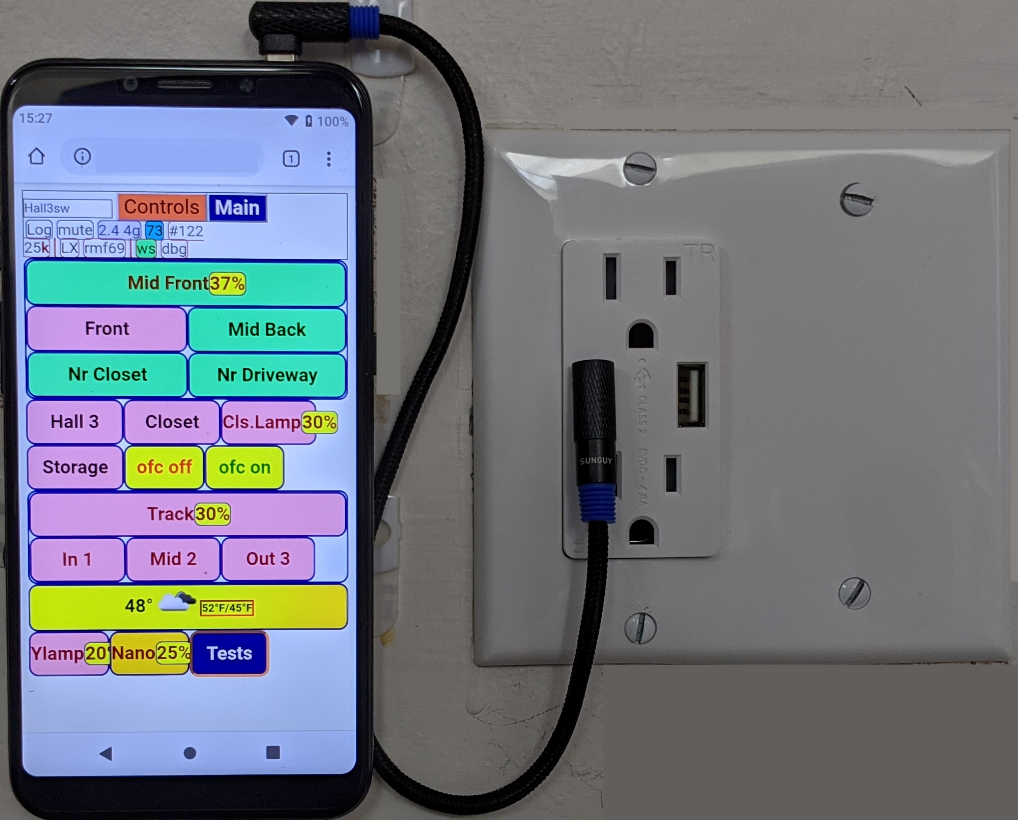
I learn by doing and implementing. A key design principle is that it has to be usable at all times even as I evolve the code. Not just usable by my family and, in particular, my wife, who can only tolerate so much geekiness. And also by visitors with no training.
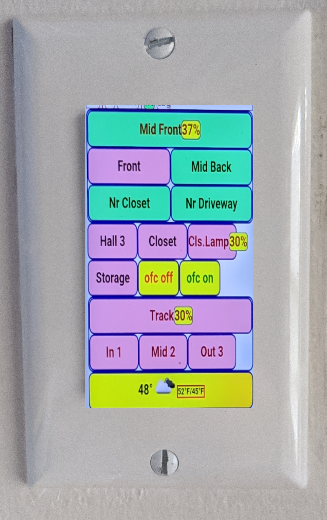 While I have not made aesthetics a priority, I do think about it. The picture above is my office “light switch” or, more generally, interactive control surface. OK, it’s also a smartphone but that’s not what its purpose is. Notice the use of USB for power. Eventually we’ll be able to simply tape flat invisible USB power cables on the wall.
The other picture is of a control surfaces in a standard light switch form factor. This example is too busy for the small area, but it is quite doable. Unlike a conventional light switch it is labelled so you don’t have to guess what the buttons do. And, based on available off-the-shelf technology it can be implemented for about $25 at current prices
The visibility means that visitors can use the controls without training. At least for simple functions. The challenges is to keep the simple functions simple and to make errors tolerable.
It isn’t idea since the surface is flat and you have to be careful where you press but this can be addressed if I were to make a production version.
Since these are mounted on the wall in the same place as traditional light switches one can turn on a light when entering a room without having to master new techniques no install additional apps.
For safety there is a separate Google account for the house which has limited capabilities and no ability to spend money.
At this point I’m only tapping into a small portion of the potential. At very least these can run Google Home and Alexa apps though I have separate devices for now. In the future they can do a lot more.
One function I did implement – they can act as doorbells.