


Contents
Preface
As with other writings in the series on my evolving home system, I don’t expect larger audience so I’m not going to spend a lot of time proofing and wordsmithing. Expect strange typos. That said, if there is a sufficient audience, I will put in more effort.
Previous versions:
- https://rmf.vc/Home2023
- https://rmf.vc/BLU2023 - A talk I gave at the Boston Linux and Unix group.
- https://rmf.vc/HomeControl2020 (still marked as a draft).
There are also a number of my columns explaining how I repurposed Internet protocols.
As I wrote this I realized how different my approach is from typical home control because it’s far more about managing sets of devices than traditional home control. Home controlling (including scripting) is an application and not fundamental. That’s the key point. I’ve factored out the underlying mechanisms so that home control can be an app.
A key point is that much of the value of my effort comes from learning by doing.
While this is ostensibly about home control it is really about connectivity and what the Internet should be. My house is a first-class network and shouldn’t be treated like a leaf at the end of an Internet I access. I will try not to get into that aspect and focus more On how I use it for home control. But as I write this I realize I can’t avoid the larger issues since the home control protocols build on concepts and protocols of the larger Internet … or, at least, should.
This is based on my 2022 rewrite and as I write this I’m mulling a major overhaul though the system is working well enough that that is not a priority. The main issue is that many changes require a restart to be recognized.
Overview
This is an update to my previous essay “Home 2023” but with a focus on the harm control system architecture as of the end of 2024. It does not replace the previous version.
The key goal is to learn by doing, and I have learned a lot. My original effort was based on X-10 and allowed me to control my lights from my computer and maybe have simple scripts. One of the early lessons was that scripting does not scale beyond the simplest cases. A good example of learning is in realizing that my simple scripting (rules) mechanism functioned as smart binding mechanism.
A major constraint is that this is the house I live in, and the test is whether it works better than a traditional house. At this point I say yes, especially now that I’ve gotten Wi-Fi working well.
“User” Experience
I put the word user in quotes because users are people and, in this case, my family. My design point for the UX is that it must be as simple as a light switch, no simpler. The traditional bank of light switches is anonymous. Mine can display legends and the current status and easily be updated. It is implemented as a web app so I can run it on any available device and can mount them on the walls, so they are as convenient as a light switch.
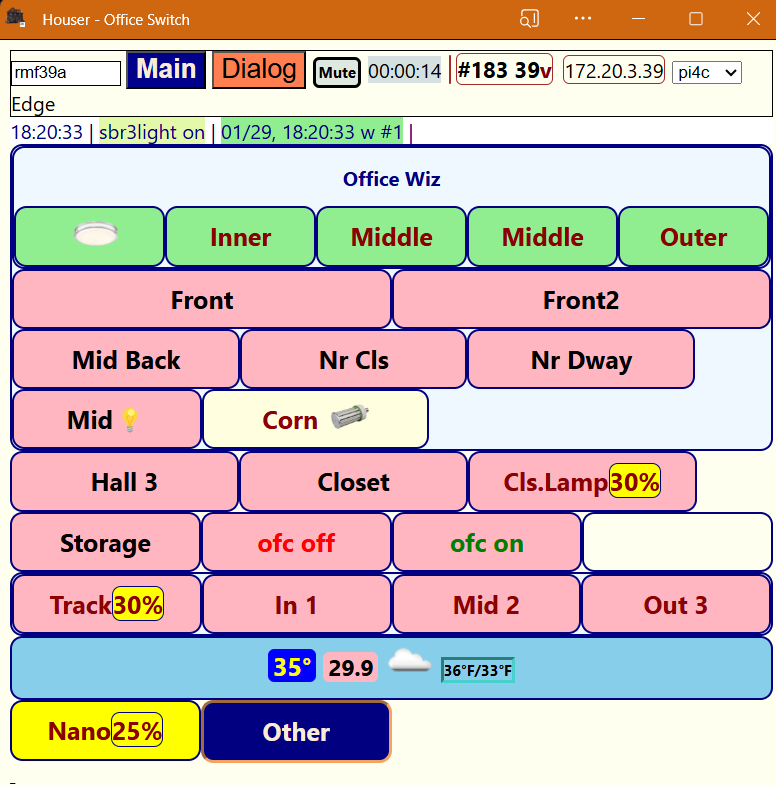
A key design point is that the messages are sent directly from the webapp to the devices. That only works for devices that can accept HTTPS requests. I can also use HTTP but can’t get a direct response for those messages. For devices that need to use other protocols I go through shims. The main shim is hosted on multiple machines to avoid single points of failure. More on that later.
There is progressive reveal. If you long press (or right mouse) you get a dialog that allows you to go to a native controller for the devices.
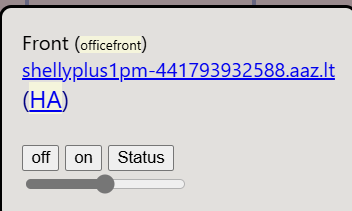 In this case there is the URL that goes to the shelly device’s native controller web server. Not all devices have that capability, so I wrote a shim for some.
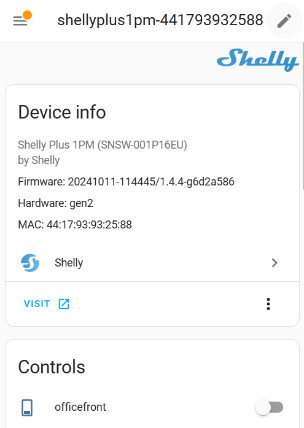 My more recent addition is the “HA” that goes to the far richer Home Assistant interface that gives access to many more features including controlling the colors – something I have not (yet) implemented.
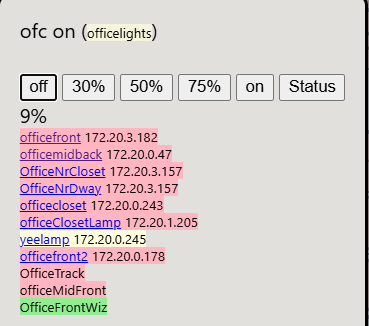 There is also a sophisticated group capability. The dialog shows the elements and allows me to go to the individual controllers if available.
The groups don’t need to be symmetric thus I can turn off all basement lights but if I turn them on, it doesn’t also turn on the bathroom heater. The key is to make such functions seem natural and you wouldn’t expect the heater to turn on just because you want to turn on the lights.
There can also be special purpose buttons, widget, which might report the weather and other information.
Each device has a default page set when it is installed as a PWA (Progressive Web App), but the blue button allows you to go to other pages.
The colors indicate the level with pink for off (red doesn’t work as well) and light green for fully on with yellow in the middle. For composite devices it averages the values of the individual devices. Note that the status is only updated when there is a message from the device – independent of reason it changed so that all surfaces display same information. If you turn a device on, then it will show an optional [off] sub button in case there is no message from the devices. Normally pressing a button marked off (pink) it would send an on. This is part of the resilient design so that single points of failure (such as the MQTT server and Home Assistant) may limit functionality but the house is still livable and works pretty much the same but without the live feedback.
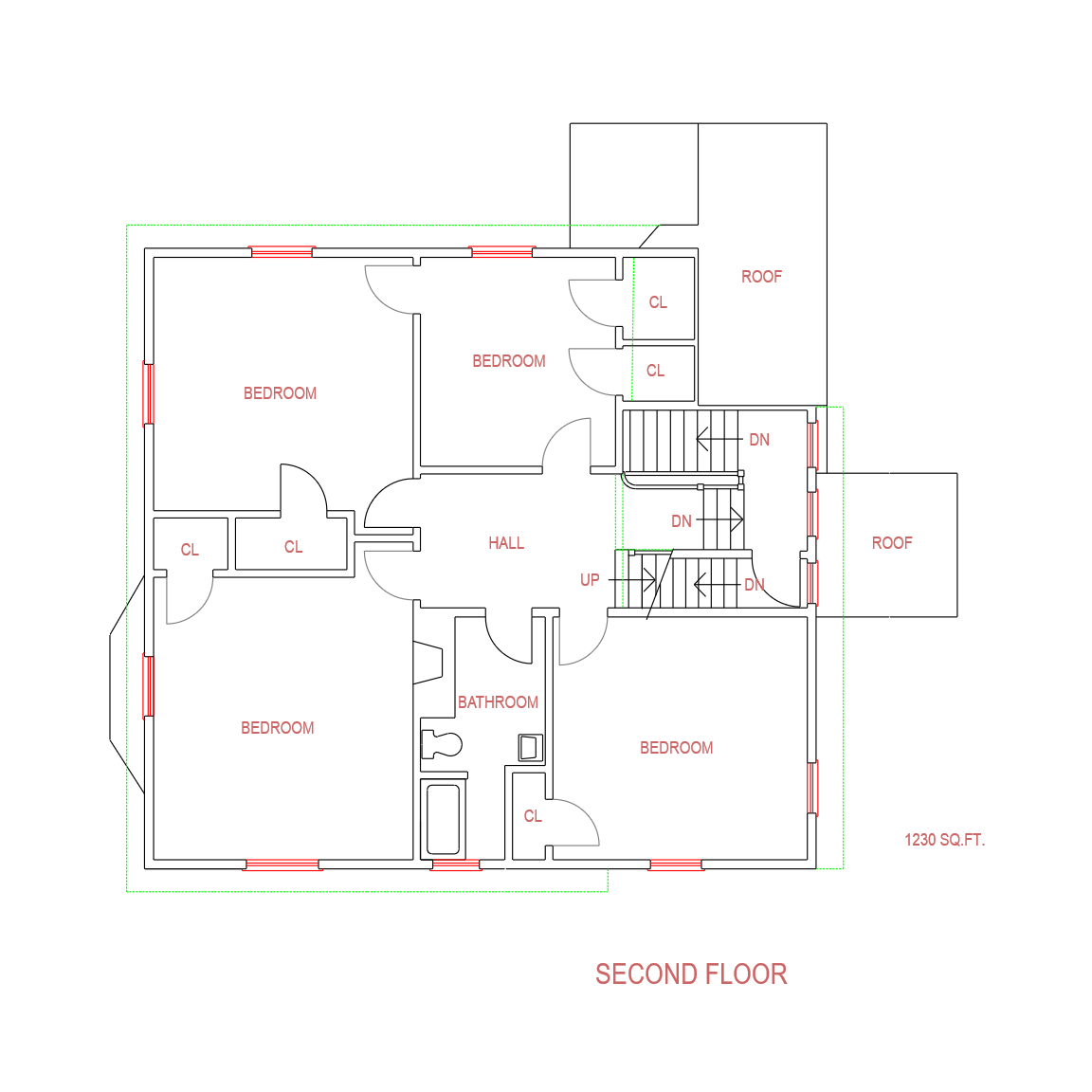 The original implementation featured a floor map, but it turned out not to be useful and hard to maintain.
It’s another reminder that people think symbolically the map isn’t that useful, especially on a small screen.
This is one of the many lessons I learned along the way.
Note also that the buttons are relatively dense. All of the apps I’ve seen a far clunkier.
There are also other devices that are more familiar and provide tactile feedback (though the buttons on the screen can click and vibrate) such as the Lutron wireless switches, standard wall switches and others.
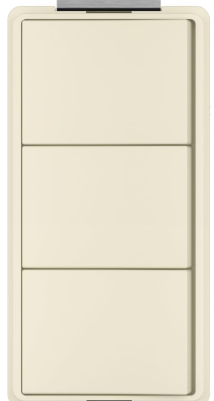
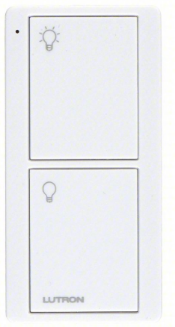
The key is that this is meant for day-to-day usage and not to be fancy.
That said, there are many ideas for how to improve the interface and capabilities, the priority is on day-to-day usability.
One more aside, 3M Command strips with Velcro are key to allowing me to mount devices and stay flexible. It’s not the most aesthetic but allows me to easily maintain and manage the control surfaces (AKA, the screens).
Most of the functionality is available from anywhere in the world and making that work is a topic in its own right. Access to some functions may not be available – though I could do so if I wanted.
Since the switches need to “just work” there is no login if you are in the house. Once you’re outside you need to provide credentials. The topic of capabilities and access control is a deep topic in its own right.
Note that in order to make my web app work from outside my app I had to put some shims in place to make it work but that’s a topic in its own right.
Wires vs. Relationships
Today housers used wired logic – you run a wire from a switch to a light bulb and you turn it off by using the switch to break the circuit or, more crudely, cut the wire. This is a smart houser with dumb endpoints must the same way the traditional phone network had to be smart because its endpoints were dumb – just microphones and speakers.
Today we have smart endpoints with computers inside the smallest device and no longer need to be limited to the wired logic. The ability to send a message to a bulb isn’t just a replacement for the wired logic but a fundamentally different way of thinking. You define the relationship between endpoints (formerly a switch and a bulb) and then can send a rich message to the bulb that can go well beyond turning the bulb on and off. You can specify color (or color temperature) as well as the level you want. Conversely the bulb can send a message to the devices to show its status.
The can play various roles. It can be part of various groupings. It can also be treated as a resource when a controller wants to provide light and chooses a mixture of bulbs and sunlight. The concept of a bulb itself needs to be rethought now that we have so many ways of providing illumination.
I am using bulbs in this example because they are very simple and well-supported. Of course, the same applies to HVAC systems and other appliances. Alas, HVAC has changed much in a century and is a topic in its own right and needs more than just replacing thermostats with fancy AI things that pretend to be your best friend.
When I install a new light source (OK, a fixture) I just connect it to power. The rest is software. The ability to define functionality is software is the key to exploring new possibilities.
Factoring and Binding
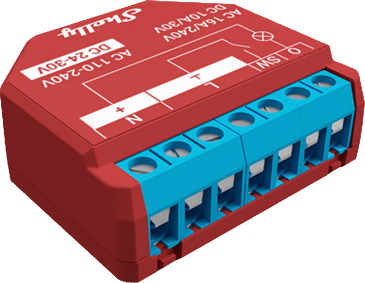
A key design tool in software is factoring the systems so that each aspect can operate and evolve independently. Thus, we separate the power distribution from control. That’s why I can just place a bulb anywhere and decide separately how to control it. The modern equivalent to wiring is binding. I just put a shared identifier in the controller and in the device and they are bound. I can send a message to the device just by knowing the identifier or I can include the identifier in a description rather than sending the message.
This is similar to linking tables in databases using a semantic-free shared key. Perhaps it is because I learned about databases over half-a-century ago the idea is obvious yet the DNS, URIs and other identifiers tend to have embedded semantics which causes unnecessary coupling and leads to problem such as expiring names and certificates. But that’s a conversation in its own right.
Linking endpoints in the physical world is no different linking endpoints in software be they tables in a database or websites or whatever.
This is akin to using the same math across disparate fields. One plus one is two whether it be Apples or Oranges. We can even add one apple plus one orange to get two fruits. It’s just math and units and categories. In business this is called logistics.
Power vs. Communicating
The first step is to completely decouple the power sources from the devices such as light bulbs. At this point, the idea of cutting the power to control a light source seems absurd and complicated. If you want to change the controller (light switch) then you have to call an electrician to rewire the house. Installing a new fixture again requires running a special wire.
You can special case some fancier cases such as controlling the light level of a bulb by having a switch which limits the voltage and knowing you have bulb that will adapt. Newer LCDs do not support varying the voltage – why should they when we have better techniques. Even something as simple as adding an extra switch to control a light from another room doesn’t work well since you can no longer look at the switch and know if the light is one or off.
Simply decoupling the messaging from the power is an enormous simplification that enables so much more. Once I have a smart bulb and messages I can ask it to turn. to a 50% level at a color temperature of 3500°. One reason, perhaps, we tolerate wired logic is that few people even know color temperature is a thing.
Another key aspect of messaging is that it is bidirectional. A bulb does not simply receive messages, it can send them to report its status.
This is the key difference between a home automation approach and a systems approach.
I’m trying to take an approach that can scale. I currently have 300 IP endpoints in my house and must find the simplicity.
Other Bindings or Decompositions
To keep things simple, I’m going to delay some of the details till later and give a slightly simplified view.
At the center of the current implementation is the device. It may be a lightbulb or a Shelly switch. Each device has an associated key – the xdev.
There also roles or places such as “light above the kitchen sink”. That particular bulb has a label of “ksink3”. There are not necessarily semantically meaningful, but the names are useful for people. Ksink3 tells me that it is the third bulb on the sink side of the kitchen. It isn’t actually a bulb – it is a role or location. That label is a role identifier which we can think of as a bulb.
Note that LIFX stores the label in the bulb which means I can’t change it unless the bulb is connected. That information is about the bulb and its context and is not intrinsic to the device!
If I replace a LIFX bulb with a Tasmota bulb I say
This says that tas393 is now bound to place “ksink3” and the previous bulb is no longer bound. Since all operations are in terms of the label “ksink3”. This is in contrast to most systems that want me to declare the bulb itself as “ksink3” and store that information inside the bulb. While this is nice for simple systems it doesn’t scale.
“ksink3” is part of a collection (or group) known as “kitchen lights”. It may be part of multiple groups. This is why the LIFX approach of putting the group name in the device doesn’t scale.
Devices are in families so we can have drivers (or adapters) for each kind of device. The idea of a family turned out to be insufficient because a device, such as a LIFX bulb, can be reached by multiple paths such as directly or via Home Assistant. The family became a special kind of direct path.
Another binding mechanism is the “simple rule”. This started out as a descriptive form of scripting so I could have a “night off” virtual device that listed all the devices that were to be turned off. It evolved to a set of rules with triggers and actions and qualifiers so that I could have a light turn on to 50% or on turn off but not turn on as part of the group action. It turned out that this works well as a grouping mechanism thus a button can be “office lights off” and turn off all the office lights. The rules are copied into the web app so that they can be implemented in the devices themselves. (see above).
Tools
The Web App
I started above by describing the webapp that is the main interface that people use. Ideally it will send messages directly to the device and listen for status changes. In practice it’s a little more complicated. As noted, those devices that don’t support http can’t be reached directly go through shims for other platforms such as Home Assistant and my central program running on my desktop.
The main engine (vdevice) acts as a web server for the web app which is a PWA so that it can run even if vdevice is not available. It gets that device status message from vdevice. If vdevice is not available it can’t show the actual status but is, otherwise, fully functional.
Vdevice
This is the latest version of the main control program. It makes use of Microsoft’s SQL Server to manage information. It acts as a switch that takes any change and sends them to each client device that is listening.
The role of this engine has evolved over the years. Initially it was a platform for scripts that controlled lights and devices using X10. It always operated on the side as an optional set of capabilities. Though very primitive by today’s standards it happened to important design principles:
- Stable endpoint identifiers (A1 through P16)
- Messages were sent directly without any central point.
- It turned things on and off (and dimmed) but didn’t define what was being turned on and off.
- Platform independence!
I’ve written previously about how X10 effected the design both good (forcing an asynchronous approach) but also bad in that the range of options was too limited, so my system didn’t take the more general approach that later systems did. While I have greatly improved the approach I’ve taken to support a wide range of devices I have not tried to incorporate all the features but instead rely on integration with platforms like Shelly and Tasmota and, more important, I provide access to the capabilities of Home Assistant.
I rewrite the control program in 2022 in TypeScript (it was previously in VB and then converted to C#). The big advantage of TypeScript:
- It is inherently asynchronous (because it’s JavaScript)
- Same language client and server and in devices.
- Prototype objects are a far better idea than static objects.
- Meshes well with JSON.
- I can write library routines that can also work as standalone commands.
This way I can share libraries with the web app and the server.
The key point is that the program (vdevice) acts as a central system for supporting the devices including the web apps but tries to stay out of the way. It maintains the databases describing the devices and their relationships and tracks their state. The goal is to avoid critical dependences.
In practice it isn’t quite as clean. Originally all complex actions such as implementing rule as implemented in vdevice but then I realized that I could run those rules on the web app – at least most of the time. The central engineer till provides key but optional roles:
- It can execute commands just like the webapp. The goal is to eventually share the same code but, for now, the code is simple enough to maintain in parallel.
- This capability is key to relaying messages without compromising security. Rather than exposing the internal devices, the central program can verify access before permitting connections. It’s a tad more complicated since the messages are relayed from the main server. As an aside, port forwarding using fixed addresses is terrible and stupid.
- It listens for MQTT messages and relays the status to the clients. (Actually, MQTT listening is its own process). Note that the MQTT listener can dynamically add new devices when they are detected.
One annoying aspect is that due to the lack of good aliasing I have to use the same name for my main machine and the vdevice machine because of the lack of aliasing and binding mechanisms!
In the future I may move to libsql (A generalization of sqllite3) to improve portability.
Shims
For full functionality apps must use HTTPS. Fortunately, I can use HTTP as long as I don’t get a response. This can work because status returns are sent from the central engine and are optional. Until there is a response the status is undefined as in this example  with shows the last status. Normally pressing the button toggles but until we’re sure the light is on we need the option of saying “try again”. It implicitly indicates we’re not sure of the status.
For devices we can’t reach using HTTP, there is a shim program that can be reached using HTTPS. It runs on multiple machines – both Linux (Pi’s) and Windows. With the availability of Home Assistant, the shim is less important but I’m still wary of having a single HA machine as a single point of failure.
Commands and Tools
I have a number of tools I wrote to help me manage my devices:
Swapbulb old new
Rebinds a new device to a location. The first argument can be the name of the location or the device. The names can be partial matches as long as they are unique. Of course it is not limited to bulbs.
iplabels
 Generates (removable) labels that I print on Brother printers.
The QR code goes the local DNS name (vs the FQDN for portability).
“hall2” is a label or location name. The de09 is a short version of the DNS name. The ip address is there for convenience. It should be stable, but the addresses do seem to change – something I’m investigating.
Pings
This is a simple program that just pings a variety of devices. It has become invaluable for understanding what is happening and tracking down problems.
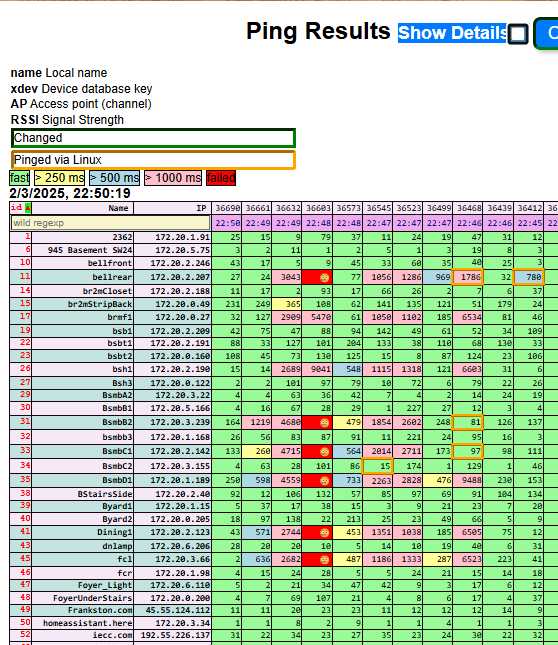
It uses an undocumented API for Ubiquiti. It lets me discover which AP a device is using and the RSSI. It’s become unreliable and I’m working to get Ubiquiti to provide officials support.
devip
This was written to get the IP address given any of the binding names. It uses the database but I’d rather DHCP would support such capabilities. The ping command uses it as a library.
Shelly Scanner
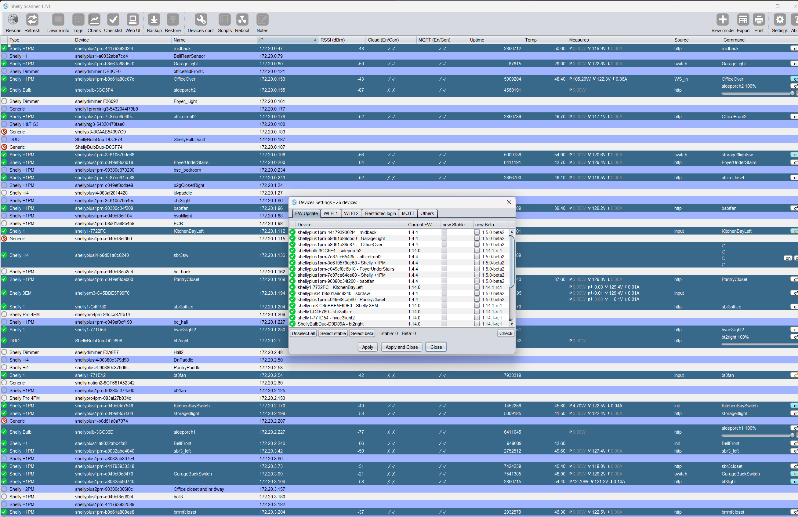
This is a tool written by Antonio Flaccomio. It allows me to view all of my active Shelly devices and manage them. This is the kind of tool that we need to work across devices and locations. Home Assistant is a step in that direction.
The key is the spreadsheet-like overview.
Home Assistant
My son introduced me to Home Assistant. I have used a number of other platforms going back to the Insteon days and then Smartthings and most recently, Hubitat. What is different about Home Assistant is that it is an open-source project with many contributors.
I am using HA “off label.” HA is a standalone platform that supports writing scripts and even apps. It also has its own web views. These web views are just standard pages that are PWAs that adapt to their screen. The HA approach is very suitable to control panels whereas my approach is meant as a mundane light-switch replacement.
I don’t know the full Zen of HA but the key points as I understand it:
- It has lots of add-ins for devices and functionality and is Python-based.
- MQTT is central in discovering and communicating with devices.
- It has its own rules and other ways to use it for scripting and automation.
- It has its own OS and can support apps such as the Mosquito MQTT server. I run that server on a separate machine to avoid a single point of failure. I can reconsider it but the I need to deal with aliasing so I can give the MQTT role its own server name. This is a key issue with DHCP that I’ve mentioned elsewhere.
- There is an HTTPS API I can use.
This API is key. It allows me to use HA as a bridge to some devices rather than a platform for home control. This allows me to treat HA as a generic bridge or drive for devices. HA also sends messages using MQTT so I can monitor them in vdevice (or its companion processes). I was able to define a generic “send all”.
One example is how I use the Lutron wireless switches I mount on my walls:
- Press the Lutron button.
- A Lutron ó IP bridge then retransmits a message.
- HA picks up the message and then sends an MQTT message.
- My MQTT listener process picks it up and uses HTTP within my host to send a message to vdevice.
- vdevice then invokes the corresponding rule.
In the case of my 16 kitchen lights, it takes less than a second for them to all turn on or off. At least when there aren’t Wi-Fi delays – a topic I’ll get to.
Adding HA created new opportunities and challenges. One aspect of my design was the idea of families of devices such as LIFX bulbs. I then added Hubitat as a kind of family and anything supported via Hubitat fell into that category. I then generalized a bit more for IP devices with Shelly and Tasmota being subsets.
HA presented a new challenge because it made sense to have devices accessible via multiple paths. I then had to rethink the idea of a “family” to distinguish between the kind of device and the path to reach it. Thus, a device has the same key (DevKey or xdev) but appears multiple times with one instance designated as the preferred path. I then need to query HA to try to match its device with mine.
Meshing the two worlds is a challenge worth the effort. I’d like to see HA expand on work with others. This includes, perhaps, providing widgets that can be used on other web pages to make capabilities available.
It’s worth noting that there is a commercial counter-part – a Nabu Casa which supports remote access and provides a hardware platform for those who would rather buy than make. I see this as a very good approach balancing a community effort with funding for adult supervision.
Going forward I see Home Assistant and Nabu Casa has playing a key role in restructuring the home control industry because it’s not so much about home automation as a chance to decouple the accidental properties of the various devices from the value added by software.
Adding voice to HA is an important opportunity. As Alexa and Google try to figure out a value proposition and capture users, HA provides a healthy alternative. Alexa and Google and, for that matter, benefit by providing services that people could use without being captured.
This isn’t without its challenges as community efforts are often tilted towards those who care too much. I think of myself as an example – once things are working well I’m not active in the community.
MQTT
Message Queuing Telemetry Transport is a useful protocol for relaying messages rather than sending them directly. One useful feature is that it doesn’t attempt to be a smart protocol in the sense of defining message formats. This means it doesn't get in the way.
Typically, part of defining a system of devices is to define the message formats and I can do that using my standard JSON, but I am not defining a single system but instead trying to coordinate disparate systems and devices thus I take on the burden of accepting the messages as they are predefined.
This has worked well because a process that complements vdevice is able to listen for MQTT messages and then convert them for vdevice.
One downside of MQTT is that it is another single point of failure. I would like a version of MQTT that supports multiple services so that there is a backup path.
For now, I try to assure availability by having my MQTT listener notice when my MQTT server is nonresponse and rebooting it using an IP-controlled plug. Fortunately, that isn’t too often – on the order of months between reboots.
I run a separate MQTT server on a Pi rather than using HA machine to avoid putting too much on a single system.
Alexa and Google Home
The basic problem is that the business model is about owning the customer so it’s a nonstarter.
These are trophy home devices. They lack the tools for managing the devices and are more concerned about security than openness. I do use them but only to a limited extent. “Turn on kitchen lights” is nice (assuming that swapbulb can updated “kitchen lights” which it can’t) but having a simple button to press at the doors is easy and tactile or positional.
Device and Connectivity Protocols
Ubiquiti
A year ago, December 2023, I updated my Ubiquiti system. I use Ubiquiti because their target market is professional. user as well as vars. Their Unifi app gives me a way to manage the Unifi devices as well as client. The major change in that upgrade was my effort to work with Unifi rather than treating the Ubiquiti router as just another router. In writing about Systems, not (just) networks I first wrote about the bindings that hold my system together. In other essays such as Beta Life, and Connectivity Starts at Home how I repurpose Internet protocols for use within my home.
When I first embarked upon my home networking effort in the 1990s I assumed I was just making my home network part of the larger Internet. The problem is that the Internet is still framed in terms of access paradigm. The idea of a network assignment identities to my devices is backwards! By putting the NAT between the home and the rest of the Internet, I allowed the local devices to get a local identity first. This is a larger design issue. We need permanent identifiers. Then the IP address doesn’t have to serve dual purposes and can be reserved as a temporary route or circuit identifiers. It also means we can think about new security models among devices such as shared secrets.
I do need to thank Ubiquiti for the help they provided tracking down problems so my system could work better. It’s only a start – much effort is needed to shift the focus to managing relationships among devices rather network-centrism. Networking is a tool, and we should’ve to think about it and more than we think about the accidental properties of the wiring of electric power in hour homes.
I see Ubiquiti has having the opportunity to play a key role if it can shift its focus from supporting the traditional networking business based on supporting vars to a business of managing connectivity among devices.
That may be asking too much, and it may be better to have an entirely different entity with Ubiquiti acting as a partner or supplier.
CEBus, 1934, Zigbee, Z-Wave, Bluetooth, Matter etc.
It’s hard to fully appreciate the lesson of the Internet and the need to properly factor the problems so that we can address aspects separately. There is a tendency to design protocols around limited scenarios and to try to solve all the problems in a single protocol. Zigbee (and, its cousin, Z-Wave) has hundreds of pages of specifications about aren’t well factored.
Zigbee, Z-wave and (seemingly Matter) want to be part of an unambiguous hierarchical world so have to be mated to controllers or simple communities.
Protocols tend to implicitly assume they are managing a coherent family of devices, typically within one site (such as a home). But my devices can be part of multiple communities, and I don’t necessarily control them.
In designing UPnP (my version which is different sharply from the problematic version Microsoft shipped, I factored out discovery (rendezvous since it isn’t just a static search), trust, naming, addressing and interfaces. Unlike mDNS I didn’t want to tie myself to the topology of the local systems. The approach I took was to treat a DNS-like database as emanating out so that a device such as a printer could choose to publish its availability to the world starting with a local DNS-like structure.
A key aspect was to use GUIDs to define interfaces (an idea inherited from Windows COM3). Thus, you could create a new interface without obsoleting the old one. When You wanted to speak to a device you can query for the preferred printer interface while allowing the interface to evolve. It allowed for a market in better interfaces.
Bluetooth was designed by phone companies so, no surprise, built the use cases into the protocols. Fortunately, a generic serial protocol could be used as an escape hatch. Bluetooth also has its own meshing protocols because … sigh. And the security model is a tedious hop by hop peering scheme rather than end-to-end.
Yet BT has its uses. The physical limitations allow it to work as a proximity sensor. Alas, Wi-Fi attempts to reproduce the broken physical security model of wired connectivity (if you can plug into the Ethernet you are “in the building”) so there is all the crap such as SSIDs, and BT allows a bypass open connection. This can also be done using a standard Wi-Fi but since BT is often shipped along with Wi-Fi on Espressif devices it works for onboarding.
Matter does have salvage value. Large companies and/or those not technically focused would rather buy a branded solution and Matter can provide that for now. Even if it is limited, as with Bluetooth, we can still integrate those devices into our realms.
Repurposing IP
The IP Address
The IP address has problems in acting as a relationship identifier and a routing identifier. For a home system this works because the NAT allows local control, but those addresses can still change. This is a why need a GUID and, pragmatically, can treat a MAC address as a stable identifier. IPV6 link-local does that.
(Yes, some systems vary the MAC address to prevent tracking but that’s like changing your name and sacrificing stable relationships so you can’t be tracked.)
While IP works well within a local network, it’s a problem when we go beyond the local domain. As I mentioned I put shims in place so that they can work.
The key reason it can work is that the protocols do not have built-in presumptions about timing and the number of hops. IEEE-1394 (firewire) is notorious for its 6-meter limit. As other protocols are tied to physical topologies and hierarchies.
The importance of IP is that it’s just an endpoint identifier (or sorts) that has the potential for a flat space (at least using GUIDs apart from the IP address) whereas other protocols increase the topological dependencies rather than moving away from them.
DHCP
DHCP, in itself, is just a way of getting IP addresses assigned dynamically but, in practice, it acts like a local DNS responding to the same protocols.
I now use the DHCP tables for binding a stable identifier such as the MAC address to an IP address. This is very different from when I would put ksink3 into the DNS. I now use a separate tool if I want to that lookup. The tool goes to my database rather than the DNS.
While I have my own tools to lookup semantic identifiers it would be nice if we had a standard mechanism for such translations – just like the DNS! In fact, the DHCP is already doing that, so it makes sense for it to be used to look up semantic identifiers to get their IP address or GUID.
VLANs (Virtual LANS) and other bad advice
This isn’t about Ubiquiti per se, but the community seems to attract “experts” who don’t understand the difference between wires and software, so they go for techniques like VLANs and subnets and use static IP addresses in order to carefully manage traffic flow and “protect” devices.
This is wonderful for the VAR because it means there is a lot of need to careful tweaking and management. I strongly object to such needless complexity. That’s why I also don’t try to have need server rack and wiring. The simplicity comes from using software to manage and define relationships. Again, that’s why I use software bindings and roles rather than designing a static system.
Topology
Alas, I do make use of VLANs as virtual wires because the current implementation of the Internet relies on topological security. If you can plug into an Ethernet you are trusted by definition. That’s why we have SSIDs for WI-FI – to emulate that model. For home networking I intended NATs to be used to protect legacy systems until encryption became the nor – alas people missed the point and treated it as a feature rather than a networking-breaking kludge.
I do use VLANs when I actually have to emulate the use of separate physical wires to keep raw traffic separate from local traffic since, because of the damn firewall, too many devices are not ready for the open Internet. Thus, I take my raw Comcast and Verizon connections to the NAT/Routers in my third-floor office. I bound multiple wires together to get multigigabit capacity between the gear on the third floor and the gear in my basement.
I have a wired connection to the various APs around the house so that no one AP has too many of the 250 (currently) Wi-Fi devices mostly at 2.4Ghz.
Device Silos and Protocols
The Device Marketplace
There are a number of fundamental problems in today’s market for home control devices. The primary one being structural with companies selling hardware when the value is in the software. They are competing against each other rather than cooperating, so we get families of applications locked into silos.
Since they are hardware companies their software is (in my opinion) fershit. The apps seemed to be designed for impressing your friend rather than day to day use. Notice how very mundane my array of buttons is – no searching through the app to find the device.
They are also designed for static scenarios rather than managing an evolving system.
The protocols typically depend on a distant server. Some like Wiz, LIFX and Govee do have a simple, local UDP protocols with quirks. Such generating a lot of chatter due to the need to poll frequently rather than being more event driven. Wiz and LIFX have http but only if you use their servers far from home – a fatal dependency.
Three is also the “as a service” concept with Tuya wanting to maintain control and assist in monetizing your life.
A big issue is onboarding. It seems to be improving but it’s still a pain and typically requires dealing with the app silo. And signing up for an account.
The idea of needing account merely to turn on a light is strange at best and intrusive.. In some apps I then have to enable other apps to connect to the device on the LAN. I guess that is sort of a security measure but that adds to the burden.
They often want to work with “channel partners” just like for other devices that are installed by third parties. The idea of the empowered user is still alien to this world.
There’s also the legacy world of Zigbee, Z-Wave and Bluetooth. Matter is a tweener – it has many of the problems of the old protocols but, at least, it is over IP and seems to be evolving away from being thread-limited. While it does have a trust (security) model my sense is that it creates local silos.
Right now, I have a given Wiz bulb, but it is not in a “room”. The app has no concept of that but if I do put it into “misc.” I’m not much better because apps like Wiz, LIFX and Alexa (!!) don’t give me a way to search for a given device. This is a WTF thing. With wiz I have to go down a couple or layers to find each bulb and then search again. With Alex I may have to scroll through hundreds of devices ordered in some variation of alphabetical that I can’t figure out. And if a device is offline I can’t even get its information. Few companies print the MAC address on the bulb. I applaud LIFX for doing that.
It’s easy to reset the bulb and onboard it. Or just reset t and onboard it.
I could go on, but you get the idea.
Alexa and Google Home and …
Of course, the silicon valley companies are going to wade into this world and try to suck you into their “as a service monetization”. If it were up to them the personal computer would not have happened. You would still be subscribing to an online service, and they might give you a home terminal.
You can’t make money if you let people own something – this is capitalism, and ownership is everything as long as the provider is the owner. OK, snarky rant off …
I find the voice interface to be convenient but it’s not enough to turn on my lights, the devices want to be my best friend and know me better than I do.
When it does come to mundane functions like turning on my lights, it works the first time but there are few tools to manage devices, and it’s all tied to remote servicer. Trying to manage hundreds of devices through their phone screens is a joke – for entertainment purposes only.
No wonder they are struggling to make money.
Some positive device examples
What’s nice is that they build on open web protocols such HTTP(S) and JSON bundles. They also support MQTT and other protocols.
It’s nice that no app is necessary – just the browser.
Shelly
I see Shelly as an example of a company selling enabling hardware without trying to capture me. OK, they do have optional services but that’s OK as long as they stay optional.
What I like is Shelly’s embrace of http and JSON bundles and their effort to work with others by supporting other protocols and acting as a Bluetooth relay. They recognize that they have a full-blown computer and take advantage of it including enabling on-device programming in a subset of JavaScript.
There is also a very useful third user-written app that allows me to manage across devices. We need that kind of tooling across devices – more on that later.
Also, Shelly supports reflashing their hardware in case you don’t like their implementation. They understand they are in the hardware business and treat software as an enabler and not a way to exclude others.
I can have a Shelly listen to a mechanical switch and perform an action such as invoking a rule. For now, I haven’t written the tolling to do that within the switch itself but I can send a message to vdevice to make the request. I do have a small program in my Shell dimmer to control a set of lights as a special implementation. The dimmer is designed to control a local light but instead I have it send messages to a set of Tasmota bulbs to set the level.
It would be very nice to have the tooling to implement that capability already available in my web app to bring the rule information to the devices dynamically but that’s a project in its own right. A better solution would be having a headless web OS … a topic in its own right.
Espressif Processors
This isn’t a device – it’s what’s inside most devices. It can cost under $1 and has Wi-Fi and Bluetooth on board with a few megabytes of RAM. It is inside many, if not most of the devices.
Tasmota
Tasmota is an open-source project that takes advantage of the popularity of Espressif chips by providing an alternative operating systems that can be flashed. You can also go to https://athom.tech to buy devices flashed with Tasmota and other alternatives.
Some of the UX is a bit clunky but well-enough documented that I now ask Copilot for how to work with Tasmota.
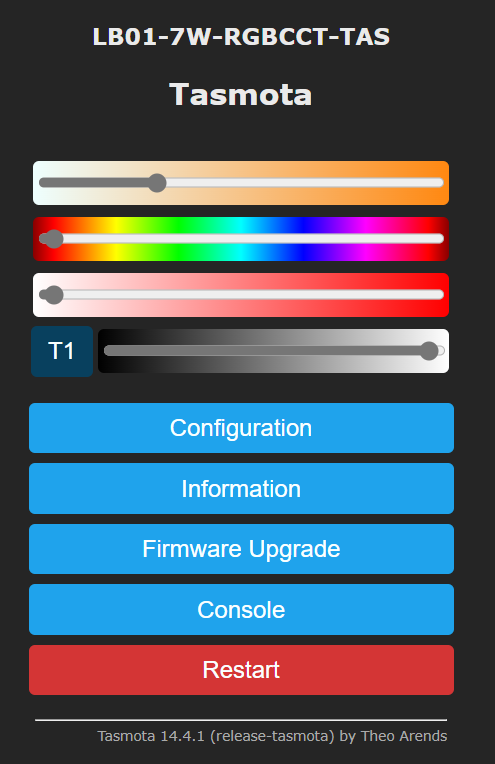
There ESPHome is another operating system and ESPHome devices can be easily flashed with Tasmota images. ESPHome is associated with the Home Assistant.
One problem with flashing bulbs may be overheating. I read a comment about how the native design is carefully balanced and a flashed version isn’t. This may be why I’m seeing so many flashed bulbs die vs. the native ones but I don’t have any solid evidence.
Honorable Mentions
I’m mentioning these because they are IP based on and open-ish in that people have figured out the protocols despite the providers.
LIFX
I have a special appreciation for LIFX because they were one of the first to make devices that I can use over IP, and they document both their remote HTTP protocol and their local UDP protocol. Before I realized I could simply use Home Assistant to create a virtual web page, I wrote my own so I could try to treat it as web device.
Note that LIFX, as a company failed, and was acquired by FEIT which has their own line of Tuya based bulbs that they feature.
Wiz
This is a companion to the Philips Hue line of Zigbee devices and it too has a UDP protocol that isn’t documented by others have ferreted it out.
Hmm, their web page doesn’t allow me to opt out of being tracked my FB – perhaps they need to supplement slim margins?
It’s worth noting that Philips spun out its lightbulb business as Signify because they lasted too long, and lightbulbs are no longer considered as consumable. (Read about the Phoebus Cartel)
Nanoleaf
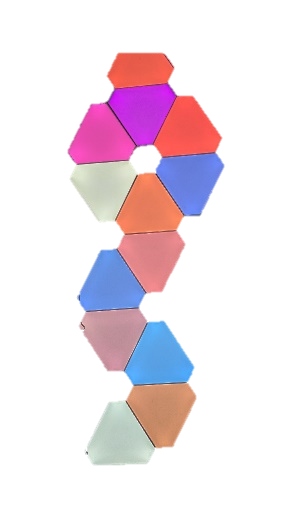
What is interesting about Nanoleaf is the founders come from a CS background and a very good API but never got the time to fully take advantage of it.
Others
There are so many others like Xiaomi (and its cousin Yeelight), Govee and … so many. Plus, the whole legacy Zigbee, Z-wave and Bluetooth world.
The IP Revolution
The so-called home control devices are only a portion of the devices in a house. Today pretty much all devices have an Internet connection (typically via Wi-Fi) even if only for mundane or gimmicky uses like updating the detergent formula tables:
- TVs are streaming now so require a connection.
- Increasingly remove controls use IP with the smartphone in particular acting as one.
- New innovations can allow starting to watch in the living room and continuing in another room or … well so many possibilities.
- My coffee maker can do auto reordering as well as updating tables.
- Washing machines – update tables and reporting completion. In an apartment you should be able to queue for use and knowing the how much more time it will take.
- Doorbells and security cameras.
- Alexa (and Google Home) have completely replaced radios (kids, a radio is ..)
- Cameras for security, watching birds etc.
- Weather stations
The important point is that these are not home automation [sic] devices. The are simply devices. In this context and given my framing of peer messaging rather than wired logic, then the IP lightbulb is not a novelty but is the only kind that makes sense.
The issue isn’t so much controlling in the automation sense but simply managing the devices. We need standards such as having a web page (both for users and APIs) for all devices. At the very least it should allow a device to say what it is. Anonymous MACs should be banned.
Special hacks like USB, Zigbee etc. should give way to this kind of shared connectivity. Yes, USB – I tried to kill it once I understood the power of fungible connectivity but was a tad too late. It is one of my regrets since I was in the Microsoft Windows group at the time. This is separate from USB repurposed as power source.
There is a huge opportunity to help legacy companies adapt to this connected world … if only they could recognize in the value of what they don’t know is a need.
Looking Ahead
Notes for the Next Iteration
Unified model to replace the device class is in the web app and vdevice with a shared “digital twin”. While I dislike the term “digital twin” it is a useful term for the model of the device that those closes really represent. It would also enable unifying the approach.
We can also unify the “drivers” that translate generic commands like “turn on” to device or path-specific actions as well as listening for changes.
The Original UPnP
In 1996 (7?) I was asked to design a Universal Plug and Play protocol for Microsoft. My approach was very different from the version Microsoft eventually shipped.
The key aspects of my design as, no surprise, factoring out each element and relying on GUIDs for binding in order to allow for each aspect to evolve:
- Interfaces are defined by GUIDs much like Microsoft’s COM3. There is no wired in printer interface – just better-known ones and a printer may have multiple interfaces and functions.
- Rendezvous not just searching. Thus, you can look for a printer with pink paper but might accept an alternative if that printer is closer.
- Of course, GUIDs for naming too (as in https://rmf.vc/ForeverURLs.
- Access control and trust are separate and use capabilities for normalization. Thus, any mechanisms could be used to apply access policies.
- Identity, trust and mapping to capabilities is not predefined though some simple cases would be implemented.
- Encryption, of course.
- Not tied to the topology. In a sense it’s the reverse of mDNS. Devices would advertise and have their advertisements cached in a DNS-like entity, but those advertisements would be relayed further as per policy. Part of this is to limit broadcast and other traffic.
- Those directories would themselves have access control so that a corporation can have policies and access.
- The IP address is not fundamental. Internet protocols are resources but layered dependency. This enables mobility.
- I also thought about dynamic routing. At the time there was the idea of mobile IP which involved complex forwarding tables. Today’s QIC protocol is a better approach in separating relationship identifiers from IP addresses.
- Endpoints weren’t necessarily devices but could be abstract or sub-entities.
Obviously there is a lot of work to be done but that work is still needed.
After Matter
Matter was designed by hardware people, and it shows. There is a need for a new class of protocols designed by software-natives that addresses the more general challenge of the many connected devices (IP or otherwise).
Perhaps HA has the critical mass to drive adoption of such protocols. I would build on what I did for UPnP but update for the new ideas. When I did my UPnP there was no JSON and HTTP APIs weren’t the norm. We have learned a lot since.
Miscellaneous
Networking advice
When I watch home networking advice online I’m struck by how much they are imitating their idea of a classic network engineer. I see some of this with Ubiquiti users who want to carefully manage traffic using subnets, VLANs and whatever knobs and gizmos they can find.
My wont is just the opposite. That’s what software is for. If you need neat wiring you’ve got your head stuck in the net. The key is to remember that the relationships between endpoints should be independent of the crap between. You want to assure the integrity of the physical path or, more to the point paths but anything more can be locking you into the accidental properties of the wiring and the current Internet already has too much of that.
In fact, in building backplanes for computers, messy wiring reduces problematic coupling of signals.
So, next time you watch a networking guru online, perhaps better to lament than imitate.
Direct Current
AC power was a big deal in the early 1900s because the technology of the day, transformers, need alternative current to bridge the gaps and enable voltage conversion. High power was also necessary for the light bulbs and other devices.
The downside is carefully managing the frequency of the signals, especially when big mechanical gear like generators can blow out. This is one reason why generators are often shut down during blacks to avoid those problems.
Today we can do all the conversions using solid state circuits and our devices also need far less power. While the USB-C power protocol has issues, it is a major advance in providing the appropriate voltage for devices. Low power DC wiring has many advantages, and, for high power, we now have DC cables that quickly shut off if there is a problem thus making the electricity less dangerous.
Once we’ve decoupled the signaling from the power distribution we can more easily innovate in power distribution.
The Next “Internet”
The term “Internet” has lost it’s meaning in the vernacular, so I’ll just use the term to mean anything to supports connectivity. The current Internet, as I explain in From Access to Connectivity, is transitional and based on traditional telecommunications networks – an inter-network. The peer connectivity that is the design point of my approach is the future with addressing and relationships independent of the accidental properties of the underlying topology of packets.
Exchanging packets is just operational and not fundamental. In a sense, today’s LLMs point in that direction in finding patterns without relying on intrinsic meaning. This is similar to the way the Internet completely decouples meaning from the bits in the packet.
Future of “vdevice”
Each time I write about my system and do tweaking I get a new understanding. My 2022 rewrite into Typescript was a key step. The goal wasn’t so much to emulate the past but rather to give me a sense of the whole program – something I’d lost in adding capabilities to my early version.
This is still a mull, but a key aspect of the design would be to share the same code in the browser as on the host system. HA has the concept of an entity apart from the physical device. In fact, my devices a much more like entities but I had to invent the concept of subdevices. Thus, a Shelly PM2 that controls two outputs is treated as two devices that happen to share an IP address. This is because the underlying database was organized that way decades ago.
The challenge is making the changes while keeping my house fully functional. The use of databases with views and now, JSON for status and comments, has provided a path for change while staying compatibility. Fortunately, I am the user community which means that I do have a degree of latitude. Hmm – maybe if I give my wife a long vacation I can risk breaking everything and fixing it in time? Naah … so I’ll focus on incremental changes for now since my goal is still to learn rather than doing the one production version.
After all, we never did ship the production version of VisiCalc – just a working beta.
Shim Within
Currently the shim app I need for UDP runs on separate machines or I can go through HA. An alternative to run a shim process on the web app host machines such as Android. It would be a localhost server. While this would be very useful and not that hard to write but not a high priority at the moment.
Connected Healthcare
Connected healthcare is an interesting example because the biggest benefit can come from the simple and mundane. I often use the example of the connected pill bottle. It simply sends a message to observers. It’s not critical being disconnected for a few hours is OK. A wearable glucose monitor may have higher requirements for connectivity.
The key is to be able to focus on the relationships and assume what I’m calling Ambient Connectivity™ anywhere in the world without having to have third parties in the path. If a doctor provides a connected device they needn’t have to explain to the patient how to set up the Internet connection and, if necessary get an account for home and account for cellular and maybe another in another venue. That’s nuts. We should be able to assume connectivity as I explain in Abundance and Opportunity.
AI
We’ve come a long way from the Jetsons as the design point of home automation. I don’t want to cede total control of my home and my life to an automaton Stepford Wives style.
That said, having an AI assist me can be welcome. It’s telling that AI, and I have a common vocabulary in today’s programming languages. It can perform tasks without time but when things get complicated programming languages provide a way for a shared understanding. And, as I wrote in About Software, that’s what programming is – a common language between me and an interpreter be it human or mechanical (or electronic).
Cities and Homes of the Future
The idea of a “smart city” misses the point. The Internet works because we denature the smart network and move those smarts to our applications and our devices. Our homes and cities may seem smarter but that’s because we’ve factored out the smarts, so they are under our control and in our software. This is why the Public Packet infrastructure is the implementation of a dumb (in the sense of not second-guessing applications) infrastructure.
Full Circle
I started this essay focusing on home control but, by the end, we’ve circled back to my effort to take this ideas writ large. It is not a coincidence – it is the result of my learning by doing and writing.
This essay may not be well-written but maybe it has made you rethink what you already understand.
Additional Notes
The system is a work-in-progress. These are notes for the next iteration or recent thoughts:
MQTT
Factoring is important so that I keep knowledge about MQTTóDevice translations confined to the DNS listening.
Just as I use the raw DNS for binding in DHCP, I use the raw names in MQTT since I’m not designing the system as a whole. Thus, if I add a Shelly device like shellydimmer2-CC7B5C526D56 I program to the name built in and know, in this case the first part is the model and the second is the MAC address. This knowledge is confined to the MQTT handler so that other listeners can coexist, and the rest of the systems doesn’t have to understand the quirks of MQTT.
This is how I approach HomeAssistant too. When I do add a message to Home Assistant as for handling Lutron Picos – I try to use the native Pico identifier and then a qualifier for the kind of message.
Twins and Entities
While I dislike the term “digital twin” I am planning to shift from a device controller model to a twin model that tries to maintain information about the device. This is a bit complicated because the twin my be out of date.
One goal is to use the same code in the browser, in my main control app and in shims.
Closely related is the idea of entities as in Home Assistant. This is better than my current approach in that entity if a face on a device. If I device has two relays say, then they are entities or subparts of a device. This is still a two-level system and, looking away, a better approach might be everything is similar but same can have parents. Tasmota does have the idea of parents.
Python vs. JavaScript
For the most part I want to keep my preference for JavaScript to myself. It’s fine if other choose Python and, in some cases, I too use Python as when I need it’s local graphics library.
But there is one way in which JavaScript is necessary for device handlers. If I write device support in JavaScript I can share it across platforms and use it in the browsers. This becomes important as I shift to a device modelling or twinning approach.
Relationships
I need a tool which sets up direct relationships so as, for example, I have a Shelly switch which send an http message to a Tasmota bulb, I can manage the relationship by having a tool to just connect the switch to the bulb. When I swap bulb that implementation of the binding should be updated.